Understanding Vertex AI Search Grounding
理解 Vertex AI Search 基础
Vertex AI Search is a powerful tool for the Agent Development Kit (ADK) that enables AI agents to access information from your private enterprise documents and data repositories. By connecting your agents to indexed enterprise content, you can provide users with answers grounded in your organization's knowledge base.
Vertex AI Search 是智能体开发工具包 (ADK) 的强大工具,它使 AI 智能体能够访问您私有企业文档和数据存储库中的信息。通过将智能体连接到索引的企业内容,您可以为用户提供基于组织知识库的回答。
This feature is particularly valuable for enterprise-specific queries requiring information from internal documentation, policies, research papers, or any proprietary content that has been indexed in your Vertex AI Search datastore. When your agent determines that information from your knowledge base is needed, it automatically searches your indexed documents and incorporates the results into its response with proper attribution.
此功能对于需要来自内部文档、政策、研究论文或已在您的 Vertex AI Search 数据存储库中索引的任何专有内容的信息的企业特定查询特别有价值。当您的智能体确定需要来自您知识库的信息时,它会自动搜索您的索引文档并将结果与适当的归属结合到其响应中。
What You'll Learn
您将学到什么
In this guide, you'll discover:
在本指南中,您将发现:
-
Quick Setup: How to create and run a Vertex AI Search-enabled agent from scratch
快速设置: 如何从头开始创建并运行启用 Vertex AI Search 的智能体
-
Grounding Architecture: The data flow and technical process behind enterprise document grounding
基础架构: 企业文档基础背后的数据流和技术流程
-
Response Structure: How to interpret grounded responses and their metadata
响应结构: 如何解释基础响应及其元数据
-
Best Practices: Guidelines for displaying citations and document references to users
最佳实践: 向用户显示引用和文档引用的指南
Vertex AI Search Grounding Quickstart
Vertex AI Search 基础快速入门
This quickstart guides you through creating an ADK agent with Vertex AI Search grounding feature. This quickstart assumes a local IDE (VS Code or PyCharm, etc.) with Python 3.10+ and terminal access.
此快速入门将指导您创建一个具有 Vertex AI Search 基础功能的 ADK 智能体。此快速入门假设您有一个本地 IDE(VS Code 或 PyCharm 等),配备 Python 3.10+ 和终端访问权限。
1. Prepare Vertex AI Search
1. 准备 Vertex AI Search
If you already have a Vertex AI Search Data Store and its Data Store ID, you can skip this section. If not, follow the instruction in the Get started with custom search until the end of Create a data store, with selecting the Unstructured data tab. With this instruction, you will build a sample Data Store with earning report PDFs from the Alphabet investor site.
如果您已经有 Vertex AI Search 数据存储库及其数据存储库 ID,则可以跳过此部分。如果没有,请按照自定义搜索入门中的说明进行操作,直到创建数据存储库结束,选择 Unstructured data 选项卡。按照此说明,您将使用 Alphabet 投资者网站 的收益报告 PDF 构建示例数据存储库。
After finishing the Create a data store section, open the Data Stores and select the data store you created, and find the Data store ID:
完成创建数据存储库部分后,打开数据存储库并选择您创建的数据存储库,找到 Data store ID:
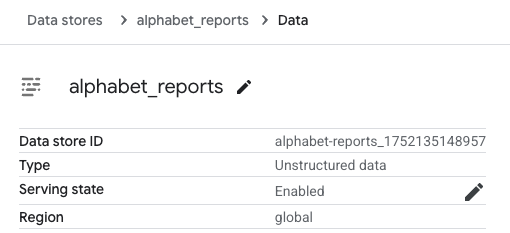
Note this Data store ID as we will use this later.
记下此 Data store ID,因为稍后我们将使用它。
2. Set up Environment & Install ADK
2. 设置环境并安装 ADK
Below are the steps for setting up your environment and installing the ADK for both Python and TypeScript projects.
以下是设置环境和安装 ADK 的步骤,适用于 Python 和 TypeScript 项目。
3. Create Agent Project
3. 创建智能体项目
Under a project directory, run the following commands:
在项目目录下,运行以下命令:
# Step 1: Create a new directory for your agent
# 步骤 1: 为您的智能体创建一个新目录
mkdir vertex_search_agent

# Step 2: Create __init__.py for the agent
# 步骤 2: 为智能体创建 __init__.py
echo "from . import agent" > vertex_search_agent/__init__.py

# Step 3: Create an agent.py (the agent definition) and .env (authentication config)
# 步骤 3: 创建 agent.py(智能体定义)和 .env(身份验证配置)
touch vertex_search_agent/agent.py .env
# Step 1: Create a new directory for your agent
# 步骤 1: 为您的智能体创建一个新目录
mkdir vertex_search_agent

# Step 2: Create __init__.py for the agent
# 步骤 2: 为智能体创建 __init__.py
echo "from . import agent" > vertex_search_agent/__init__.py

# Step 3: Create an agent.py (the agent definition) and .env (authentication config)
# 步骤 3: 创建 agent.py(智能体定义)和 .env(身份验证配置)
type nul > vertex_search_agent\agent.py
type nul > google_search_agent\.env
Edit agent.py
编辑 agent.py
Copy and paste the following code into agent.py, and replace YOUR_PROJECT_ID and YOUR_DATASTORE_ID at the Configuration part with your project ID and Data Store ID accordingly:
将以下代码复制并粘贴到 agent.py 中,并在 Configuration 部分相应地用您的项目 ID 和数据存储库 ID 替换 YOUR_PROJECT_ID 和 YOUR_DATASTORE_ID:
from google.adk.agents import Agent
from google.adk.tools import VertexAiSearchTool

# Configuration
# 配置
DATASTORE_ID = "projects/YOUR_PROJECT_ID/locations/global/collections/default_collection/dataStores/YOUR_DATASTORE_ID"

root_agent = Agent(
    name="vertex_search_agent",
    model="gemini-2.5-flash",
    instruction="Answer questions using Vertex AI Search to find information from internal documents. Always cite sources when available.",
    description="Enterprise document search assistant with Vertex AI Search capabilities",
    tools=[VertexAiSearchTool(data_store_id=DATASTORE_ID)]
)
Now you would have the following directory structure:
现在您将拥有以下目录结构:
4. Authentication Setup
4. 身份验证设置
Note: Vertex AI Search requires Google Cloud Platform (Vertex AI) authentication. Google AI Studio is not supported for this tool.
注意:Vertex AI Search 需要 Google Cloud Platform (Vertex AI) 身份验证。此工具不支持 Google AI Studio。
-
Set up the gcloud CLI
设置 gcloud CLI
-
Authenticate to Google Cloud, from the terminal by running
gcloud auth login.通过从终端运行
gcloud auth login来验证 Google Cloud 身份。 -
Open the
.envfile and copy-paste the following code and update the project ID and location.打开
.env文件并复制粘贴以下代码并更新项目 ID 和位置。
5. Run Your Agent
5. 运行您的智能体
There are multiple ways to interact with your agent:
有多种方式与您的智能体交互:
运行以下命令以启动 dev UI。
Note for Windows users
Windows 用户注意
When hitting the _make_subprocess_transport NotImplementedError, consider using adk web --no-reload instead.
当遇到 _make_subprocess_transport NotImplementedError 时,考虑使用 adk web --no-reload 代替。
Step 1: Open the URL provided (usually http://localhost:8000 or
http://127.0.0.1:8000) directly in your browser.
步骤 1: 直接在浏览器中打开提供的 URL(通常是 http://localhost:8000 或
http://127.0.0.1:8000)。
Step 2. In the top-left corner of the UI, you can select your agent in the dropdown. Select "vertex_search_agent".
步骤 2. 在 UI 的左上角,您可以在下拉菜单中选择您的智能体。选择 "vertex_search_agent"。
Troubleshooting
故障排除
If you do not see "vertex_search_agent" in the dropdown menu, make sure you
are running adk web in the parent folder of your agent folder
(i.e. the parent folder of vertex_search_agent).
如果您在下拉菜单中看不到 "vertex_search_agent",请确保您
在智能体文件夹的父文件夹中运行 adk web
(即 vertex_search_agent 的父文件夹)。
Step 3. Now you can chat with your agent using the textbox.
步骤 3. 现在您可以使用文本框与智能体聊天。
Example prompts to try
要尝试的示例提示
With those questions, you can confirm that the agent is actually calling Vertex AI Search to get information from the Alphabet reports:
使用这些问题,您可以确认智能体实际上正在调用 Vertex AI Search 以从 Alphabet 报告中获取信息:
-
What is the revenue of Google Cloud in 2022 Q1?
Google Cloud 在 2022 年第一季度的收入是多少?
-
What about YouTube?
YouTube 呢?
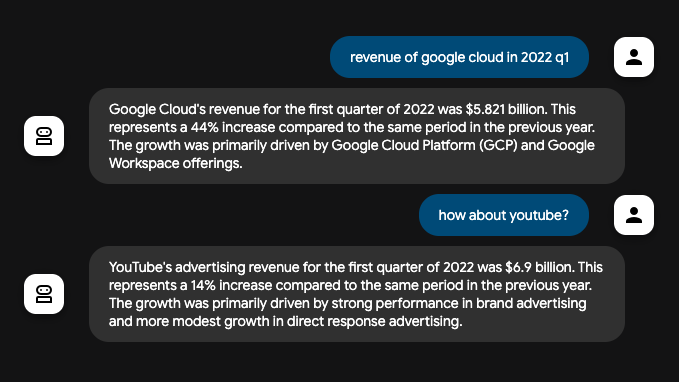
You've successfully created and interacted with your Vertex AI Search agent using ADK!
您已经使用 ADK 成功创建并与 Vertex AI Search 智能体进行了交互!
How grounding with Vertex AI Search works
Vertex AI Search 基础如何工作
Grounding with Vertex AI Search is the process that connects your agent to your organization's indexed documents and data, allowing it to generate accurate responses based on private enterprise content. When a user's prompt requires information from your internal knowledge base, the agent's underlying LLM intelligently decides to invoke the VertexAiSearchTool to find relevant facts from your indexed documents.
使用 Vertex AI Search 进行基础是将您的智能体连接到组织索引文档和数据的过程,使其能够基于私有企业内容生成准确的响应。当用户的提示需要来自您的内部知识库的信息时,智能体的底层 LLM 会智能地决定调用 VertexAiSearchTool 以从您的索引文档中查找相关事实。
Data Flow Diagram
数据流图
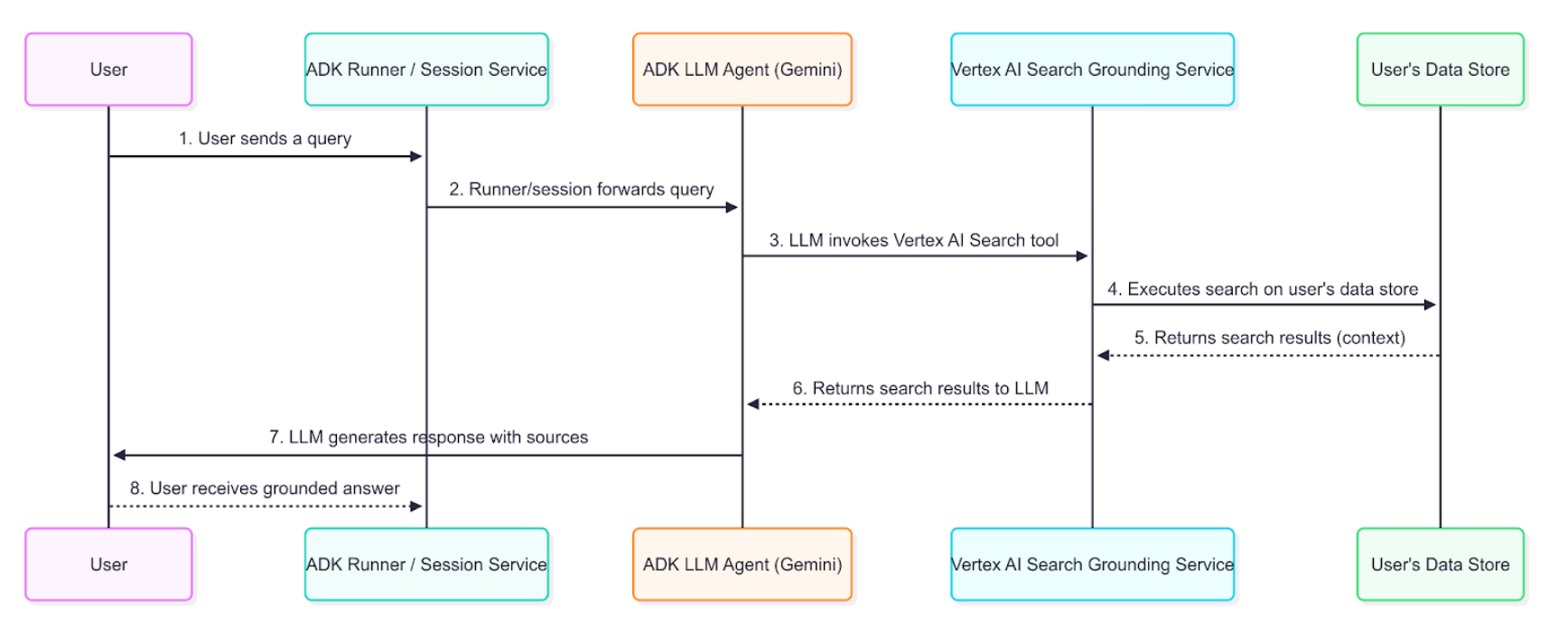
This diagram illustrates the step-by-step process of how a user query results in a grounded response.
此图说明了用户查询如何产生基础响应的分步过程。
Detailed Description
详细描述
The grounding agent uses the data flow described in the diagram to retrieve, process, and incorporate enterprise information into the final answer presented to the user.
基础智能体使用图中描述的数据流来检索、处理并将企业信息整合到呈现给用户的最终答案中。
-
User Query: An end-user interacts with your agent by asking a question about internal documents or enterprise data.
用户查询: 最终用户通过询问有关内部文档或企业数据的问题与您的智能体交互。
-
ADK Orchestration: The Agent Development Kit orchestrates the agent's behavior and passes the user's message to the core of your agent.
ADK 编排: 智能开发工具包编排智能体的行为并将用户的消息传递给智能体的核心。
-
LLM Analysis and Tool-Calling: The agent's LLM (e.g., a Gemini model) analyzes the prompt. If it determines that information from your indexed documents is required, it triggers the grounding mechanism by calling the VertexAiSearchTool. This is ideal for answering queries about company policies, technical documentation, or proprietary research.
LLM 分析和工具调用: 智能体的 LLM(例如,Gemini 模型)分析提示。如果它确定需要来自索引文档的信息,它会通过调用 VertexAiSearchTool 触发基础机制。这非常适合回答有关公司政策、技术文档或专有研究的查询。
-
Vertex AI Search Service Interaction: The VertexAiSearchTool interacts with your configured Vertex AI Search datastore, which contains your indexed enterprise documents. The service formulates and executes search queries against your private content.
Vertex AI Search 服务交互: VertexAiSearchTool 与您配置的 Vertex AI Search 数据存储库(包含您的索引企业文档)交互。服务针对您的私有内容制定并执行搜索查询。
-
Document Retrieval & Ranking: Vertex AI Search retrieves and ranks the most relevant document chunks from your datastore based on semantic similarity and relevance scoring.
文档检索和排名: Vertex AI Search 根据语义相似度和相关性评分从您的数据存储库中检索和排名最相关的文档块。
-
Context Injection: The search service integrates the retrieved document snippets into the model's context before the final response is generated. This crucial step allows the model to "reason" over your organization's factual data.
上下文注入: 搜索服务在生成最终响应之前将检索到的文档片段集成到模型的上下文中。这一关键步骤允许模型对组织的实际数据进行"推理"。
-
Grounded Response Generation: The LLM, now informed by relevant enterprise content, generates a response that incorporates the retrieved information from your documents.
基础响应生成: 现在,由相关企业内容告知的 LLM 生成一个响应,该响应结合了从您的文档检索到的信息。
-
Response Presentation with Sources: The ADK receives the final grounded response, which includes the necessary source document references and groundingMetadata, and presents it to the user with attribution. This allows end-users to verify the information against your enterprise sources.
带来源的响应呈现: ADK 接收最终的基础响应,其中包含必要的源文档引用和 groundingMetadata,并将其与归属一起呈现给用户。这允许最终用户根据企业来源验证信息。
Understanding grounding with Vertex AI Search response
理解 Vertex AI Search 基础响应
When the agent uses Vertex AI Search to ground a response, it returns detailed information that includes the final text answer and metadata about the documents used to generate that answer. This metadata is crucial for verifying the response and providing attribution to your enterprise sources.
当智能体使用 Vertex AI Search 进行基础响应时,它会返回详细信息,包括最终文本答案和用于生成该答案的文档的元数据。此元数据对于验证响应和向企业来源提供归属至关重要。
Example of a Grounded Response
基础响应示例
The following is an example of the content object returned by the model after a grounded query against enterprise documents.
以下是对企业文档进行基础查询后模型返回的内容对象的示例。
Final Answer Text:
最终答案文本:
"Developing models for a medical scribe presents several significant challenges, primarily due to the complex nature of medical documentation, the sensitive data involved, and the demanding requirements of clinical workflows. Key challenges include: **Accuracy and Reliability:** Medical documentation requires extremely high levels of accuracy, as errors can lead to misdiagnoses, incorrect treatments, and legal repercussions. Ensuring that AI models can reliably capture nuanced medical language, distinguish between subjective and objective information, and accurately transcribe physician-patient interactions is a major hurdle. **Natural Language Understanding (NLU) and Speech Recognition:** Medical conversations are often rapid, involve highly specialized jargon, acronyms, and abbreviations, and can be spoken by individuals with diverse accents or speech patterns... [response continues with detailed analysis of privacy, integration, and technical challenges]"
Grounding Metadata Snippet:
基础元数据片段:
This is the grounding metadata you will receive. On adk web, you can find this on the Response tab:
这是您将收到的 Grounding 元数据。在 adk web 上,您可以在 Response 选项卡上找到它:
{
  "groundingMetadata": {
    "groundingChunks": [
      {
        "document": {
          "title": "AI in Medical Scribing: Technical Challenges",
          "uri": "projects/your-project/locations/global/dataStores/your-datastore-id/documents/doc-medical-scribe-ai-tech-challenges",
          "id": "doc-medical-scribe-ai-tech-challenges"
        }
      },
      {
        "document": {
          "title": "Regulatory and Ethical Hurdles for AI in Healthcare",
          "uri": "projects/your-project/locations/global/dataStores/your-datastore-id/documents/doc-ai-healthcare-ethics",
          "id": "doc-ai-healthcare-ethics"
        }
      }
      // ... additional documents
      // ...其他文档
    ],
    "groundingSupports": [
      {
        "groundingChunkIndices": [0, 1],
        "segment": {
          "endIndex": 637,
          "startIndex": 433,
          "text": "Ensuring that AI models can reliably capture nuanced medical language..."
        }
      }
      // ... additional supports linking text segments to source documents
      // ...其他将文本段链接到源文档的支持
    ],
    "retrievalQueries": [
      "challenges in natural language processing medical domain",
      "AI medical scribe challenges",
      "difficulties in developing AI for medical scribes"
      // ... additional search queries executed
      // ...执行的其他搜索查询
    ]
  }
}
How to Interpret the Response
如何解释响应
The metadata provides a link between the text generated by the model and the enterprise documents that support it. Here is a step-by-step breakdown:
元数据提供了模型生成的文本与支持它的企业文档之间的链接。以下是分步分解:
-
groundingChunks: This is a list of the enterprise documents the model consulted. Each chunk contains the document title, uri (document path), and id.
groundingChunks: 这是模型查阅的企业文档列表。每个块包含文档标题、uri(文档路径)和 id。
-
groundingSupports: This list connects specific sentences in the final answer back to the
groundingChunks.groundingSupports: 此列表将最终答案中的特定句子连接回
groundingChunks。 -
segment: This object identifies a specific portion of the final text answer, defined by its
startIndex,endIndex, and thetextitself.segment: 此对象标识最终文本答案的特定部分,由其
startIndex、endIndex和文本本身定义。 -
groundingChunkIndices: This array contains index numbers that correspond to the sources listed in the
groundingChunks. For example, the text about "HIPAA compliance" is supported by information fromgroundingChunksat index 1 (the "Regulatory and Ethical Hurdles" document).groundingChunkIndices: 此数组包含与
groundingChunks中列出的源相对应的索引号。例如,关于 "HIPAA 合规性" 的文本由索引 1 处的groundingChunks(即 "Regulatory and Ethical Hurdles" 文档)中的信息支持。 -
retrievalQueries: This array shows the specific search queries that were executed against your datastore to find relevant information.
retrievalQueries: 此数组显示针对您的数据存储库执行以查找相关信息的特定搜索查询。
How to display grounding responses with Vertex AI Search
如何显示 Vertex AI Search 基础响应
Unlike Google Search grounding, Vertex AI Search grounding does not require specific display components. However, displaying citations and document references builds trust and allows users to verify information against your organization's authoritative sources.
与 Google Search 基础不同,Vertex AI Search 基础不需要特定的显示组件。但是,显示引用和文档引用可以建立信任,并允许用户根据组织的权威来源验证信息。
Optional Citation Display
可选的引用显示
Since grounding metadata is provided, you can choose to implement citation displays based on your application needs:
由于提供了基础元数据,您可以根据应用程序需求选择实现引用显示:
Simple Text Display (Minimal Implementation):
简单文本显示(最小实现):
for event in events:
    if event.is_final_response():
        print(event.content.parts[0].text)

        # Optional: Show source count
        # 可选:显示来源数量
        if event.grounding_metadata:
            print(f"\nBased on {len(event.grounding_metadata.grounding_chunks)} documents")
Enhanced Citation Display (Optional): You can implement interactive citations that show which documents support each statement. The grounding metadata provides all necessary information to map text segments to source documents.
增强的引用显示(可选): 您可以实现交互式引用,显示哪些文档支持每个陈述。基础元数据提供了将文本段映射到源文档的所有必要信息。
Implementation Considerations
实现注意事项
When implementing Vertex AI Search grounding displays:
实现 Vertex AI Search 基础显示时:
-
Document Access: Verify user permissions for referenced documents
文档访问: 验证用户对引用文档的权限
-
Simple Integration: Basic text output requires no additional display logic
简单集成: 基本文本输出不需要额外的显示逻辑
-
Optional Enhancements: Add citations only if your use case benefits from source attribution
可选增强: 仅当您的用例受益于源归属时才添加引用
-
Document Links: Convert document URIs to accessible internal links when needed
文档链接: 需要时将文档 URI 转换为可访问的内部链接
-
Search Queries: The retrievalQueries array shows what searches were performed against your datastore
搜索查询: retrievalQueries 数组显示对您的数据存储库执行了哪些搜索
Summary
总结
Vertex AI Search Grounding transforms AI agents from general-purpose assistants into enterprise-specific knowledge systems capable of providing accurate, source-attributed information from your organization's private documents. By integrating this feature into your ADK agents, you enable them to:
Vertex AI Search 基础将 AI 智能体从通用助手转变为企业特定知识系统,能够从您的私有文档提供准确的、有来源归属的信息。通过将此功能集成到您的 ADK 智能体中,您使它们能够:
-
Access proprietary information from your indexed document repositories
从您的索引文档存储库访问专有信息
-
Provide source attribution for transparency and trust
提供来源归属以实现透明度和信任
-
Deliver comprehensive answers with verifiable enterprise facts
提供具有可验证企业事实的全面答案
-
Maintain data privacy within your Google Cloud environment
在您的 Google Cloud 环境中保持数据隐私
The grounding process seamlessly connects user queries to your organization's knowledge base, enriching responses with relevant context from your private documents while maintaining the conversational flow. With proper implementation, your agents become powerful tools for enterprise information discovery and decision-making.
基础过程将用户查询无缝连接到您的组织知识库,用来自私有文档的相关上下文丰富响应,同时保持对话流程。通过正确实施,您的智能体将成为企业信息发现和决策制定的强大工具。