Agent Observability with AgentOps
使用 AgentOps 进行智能体可观测性
With just two lines of code, AgentOps provides session replays, metrics, and monitoring for agents.
只需两行代码,AgentOps 为智能体提供会话重放、指标和监控功能。
Why AgentOps for ADK?
为什么在 ADK 中使用 AgentOps?
Observability is a key aspect of developing and deploying conversational AI agents. It allows developers to understand how their agents are performing, how their agents are interacting with users, and how their agents use external tools and APIs.
可观测性是开发和部署对话式 AI 智能体的关键方面。它允许开发者了解他们的智能体如何执行、智能体如何与用户交互,以及智能体如何使用外部工具和 API。
By integrating AgentOps, developers can gain deep insights into their ADK agent's behavior, LLM interactions, and tool usage.
通过集成 AgentOps,开发者可以深入了解其 ADK 智能体的行为、LLM 交互和工具使用情况。
Google ADK includes its own OpenTelemetry-based tracing system, primarily aimed at providing developers with a way to trace the basic flow of execution within their agents. AgentOps enhances this by offering a dedicated and more comprehensive observability platform with:
Google ADK 包含自己基于 OpenTelemetry 的跟踪系统,主要为开发者提供一种在其智能体内跟踪基本执行流的方式。AgentOps 通过提供专用且更全面的可观测性平台来增强这一点,具有以下功能:
-
Unified Tracing and Replay Analytics: Consolidate traces from ADK and other components of your AI stack.
统一的跟踪和重放分析:整合来自 ADK 和 AI 堆栈其他组件的跟踪数据。
-
Rich Visualization: Intuitive dashboards to visualize agent execution flow, LLM calls, and tool performance.
丰富的可视化:直观的仪表板,用于可视化智能体执行流程、LLM 调用和工具性能。
-
Detailed Debugging: Drill down into specific spans, view prompts, completions, token counts, and errors.
详细的调试:深入查看特定跨度,查看提示、完成、令牌计数和错误。
-
LLM Cost and Latency Tracking: Track latencies, costs (via token usage), and identify bottlenecks.
LLM 成本和延迟跟踪:跟踪延迟、成本(通过令牌使用情况),并识别瓶颈。
-
Simplified Setup: Get started with just a few lines of code.
简化的设置:只需几行代码即可开始使用。
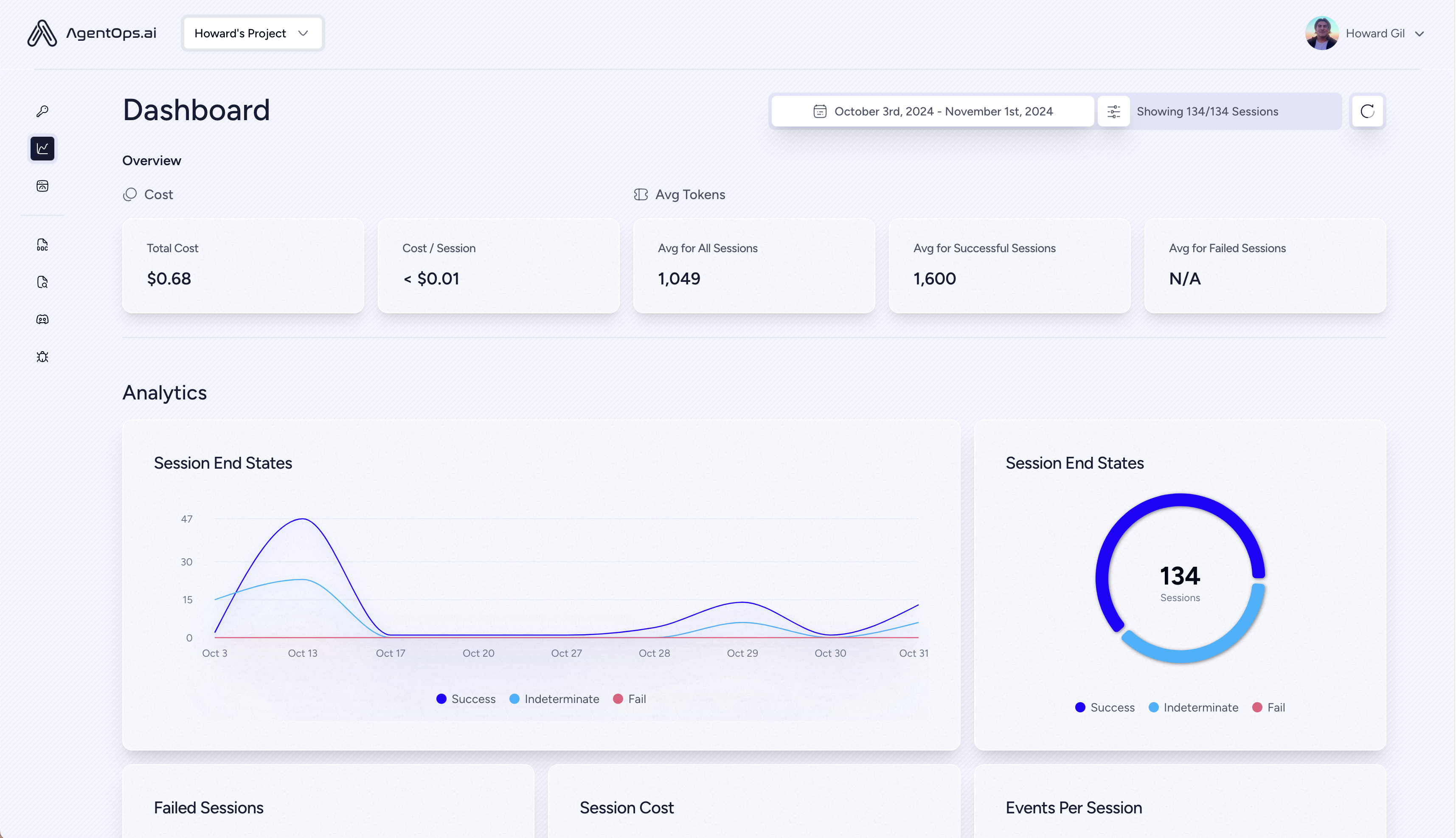
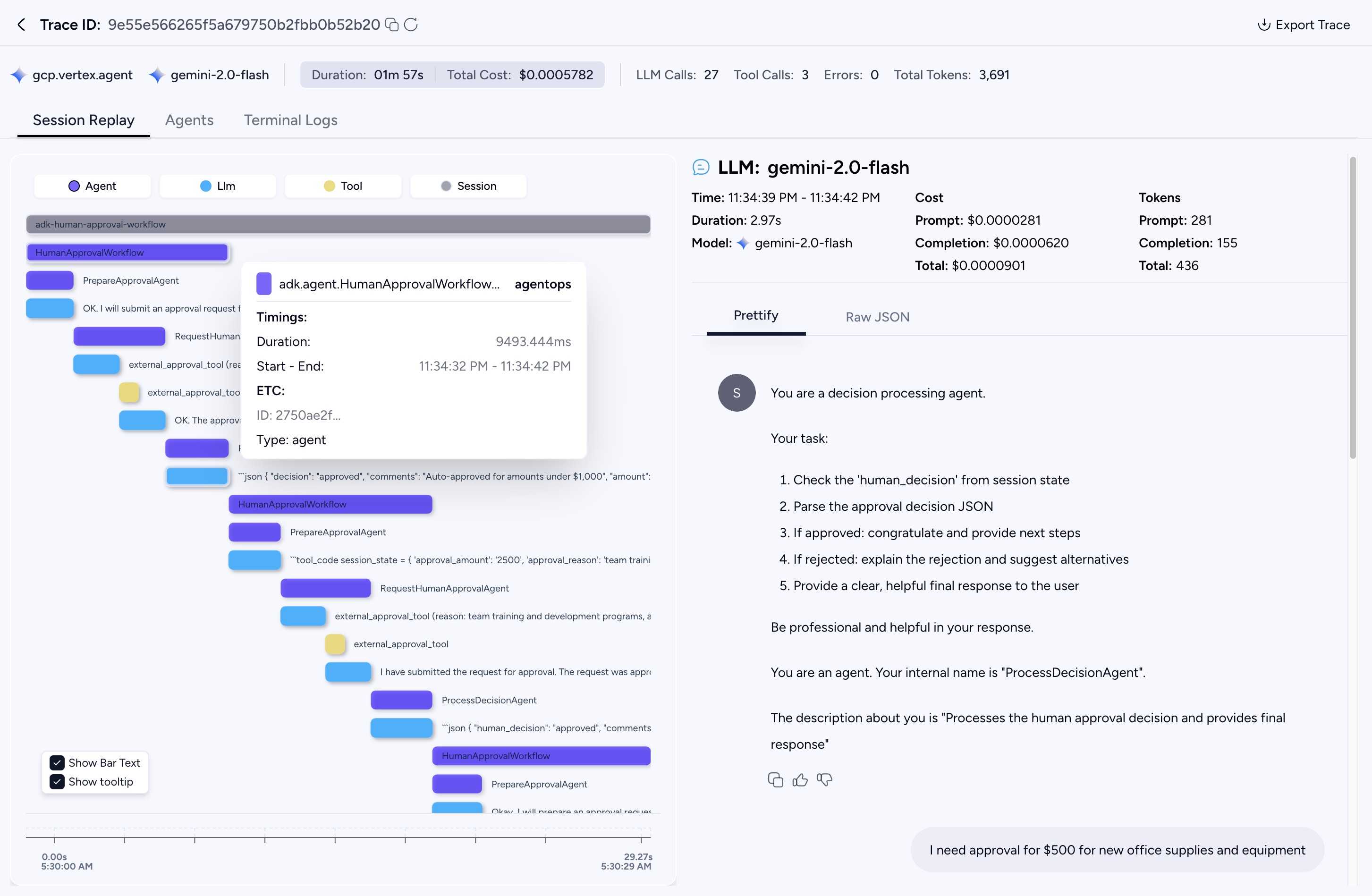
AgentOps dashboard displaying a trace from a multi-step ADK application execution. You can see hierarchical structure of spans, including main agent workflow, individual sub-agents, LLM calls, and tool executions. Note the clear hierarchy: the main workflow agent span contains child spans for various sub-agent operations, LLM calls, and tool executions.
AgentOps 仪表板显示来自多步骤 ADK 应用程序执行的跟踪。您可以看到跨度的分层结构,包括主智能体工作流、各个子智能体、LLM 调用和工具执行。请注意清晰的层次结构:主工作流智能体跨度包含各种子智能体操作、LLM 调用和工具执行的子跨度。
Getting Started with AgentOps and ADK
开始使用 AgentOps 和 ADK
Integrating AgentOps into your ADK application is straightforward:
将 AgentOps 集成到您的 ADK 应用程序中非常简单:
-
Install AgentOps:
安装 AgentOps:
-
Create an API Key
创建 API 密钥
Create a user API key here: Create API Key and configure your environment:
在此处创建用户 API 密钥:创建 API 密钥 并配置您的环境:
Add your API key to your environment variables:
将您的 API 密钥添加到环境变量:
-
Initialize AgentOps:
初始化 AgentOps:
Add the following lines at the beginning of your ADK application script (e.g., your main Python file running the ADK
Runner):在 ADK 应用程序脚本的开头添加以下行(例如,运行 ADK
Runner的主 Python 文件):This will initiate an AgentOps session as well as automatically track ADK agents.
这将启动 AgentOps 会话并自动跟踪 ADK 智能体。
Detailed example:
详细示例:
import agentops
import os
from dotenv import load_dotenv

# Load environment variables (optional, if you use a .env file for API keys)
# 加载环境变量(可选,如果您使用 .env 文件存储 API 密钥)
load_dotenv()

agentops.init(
    api_key=os.getenv("AGENTOPS_API_KEY"), # Your AgentOps API Key 您的 AgentOps API 密钥
    trace_name="my-adk-app-trace"  # Optional: A name for your trace 可选:为您的跟踪指定一个名称
    # auto_start_session=True is the default.
    # auto_start_session=True 是默认值。
    # Set to False if you want to manually control session start/end.
    # 如果您想手动控制会话的开始/结束,则设置为 False。
)
🚨 🔑 You can find your AgentOps API key on your AgentOps Dashboard after signing up. It's recommended to set it as an environment variable (
AGENTOPS_API_KEY).🚨 🔑 注册后,您可以在 AgentOps 仪表板 上找到您的 AgentOps API 密钥。建议将其设置为环境变量(
AGENTOPS_API_KEY)。
Once initialized, AgentOps will automatically begin instrumenting your ADK agent.
初始化后,AgentOps 将自动开始检测您的 ADK 智能体。
This is all you need to capture all telemetry data for your ADK agent
这就是捕获 ADK 智能体的所有遥测数据所需的全部操作
How AgentOps Instruments ADK
AgentOps 如何检测 ADK
AgentOps employs a sophisticated strategy to provide seamless observability without conflicting with ADK's native telemetry:
AgentOps 采用复杂的策略来提供无缝的可观测性,而不会与 ADK 的本机遥测冲突:
-
Neutralizing ADK's Native Telemetry:
中和 ADK 的本机遥测:
AgentOps detects ADK and intelligently patches ADK's internal OpenTelemetry tracer (typically
trace.get_tracer('gcp.vertex.agent')). It replaces it with aNoOpTracer, ensuring that ADK's own attempts to create telemetry spans are effectively silenced. This prevents duplicate traces and allows AgentOps to be the authoritative source for observability data.AgentOps 检测 ADK 并智能地修补 ADK 的内部 OpenTelemetry 跟踪器(通常是
trace.get_tracer('gcp.vertex.agent'))。它将其替换为NoOpTracer,确保 ADK 自身创建遥测跨度的尝试被有效地静音。这防止了重复的跟踪,并允许 AgentOps 成为可观测性数据的权威来源。 -
AgentOps-Controlled Span Creation:
AgentOps 控制的跨度创建:
AgentOps takes control by wrapping key ADK methods to create a logical hierarchy of spans:
AgentOps 通过包装关键 ADK 方法来控制,创建跨度的逻辑层次结构:
-
Agent Execution Spans (e.g.,
adk.agent.MySequentialAgent):智能体执行跨度(例如,
adk.agent.MySequentialAgent):When an ADK agent (like
BaseAgent,SequentialAgent, orLlmAgent) starts itsrun_asyncmethod, AgentOps initiates a parent span for that agent's execution.当 ADK 智能体(如
BaseAgent、SequentialAgent或LlmAgent)启动其run_async方法时,AgentOps 为该智能体的执行启动父跨度。 -
LLM Interaction Spans (e.g.,
adk.llm.gemini-pro):LLM 交互跨度(例如,
adk.llm.gemini-pro):For calls made by an agent to an LLM (via ADK's
BaseLlmFlow._call_llm_async), AgentOps creates a dedicated child span, typically named after the LLM model. This span captures request details (prompts, model parameters) and, upon completion (via ADK's_finalize_model_response_event), records response details like completions, token usage, and finish reasons.对于智能体对 LLM 的调用(通过 ADK 的
BaseLlmFlow._call_llm_async),AgentOps 创建一个专用的子跨度,通常以 LLM 模型命名。此跨度捕获请求详细信息(提示、模型参数),并在完成时(通过 ADK 的_finalize_model_response_event),记录响应详细信息,如完成、令牌使用和完成原因。 -
Tool Usage Spans (e.g.,
adk.tool.MyCustomTool):工具使用跨度(例如,
adk.tool.MyCustomTool):When an agent uses a tool (via ADK's
functions.__call_tool_async), AgentOps creates a single, comprehensive child span named after the tool. This span includes the tool's input parameters and the result it returns.当智能体使用工具(通过 ADK 的
functions.__call_tool_async)时,AgentOps 创建一个以工具命名的单一、全面的子跨度。此跨度包括工具的输入参数和返回的结果。
-
-
Rich Attribute Collection:
丰富的属性收集:
AgentOps reuses ADK's internal data extraction logic. It patches ADK's specific telemetry functions (e.g.,
google.adk.telemetry.trace_tool_call,trace_call_llm). The AgentOps wrappers for these functions take the detailed information ADK gathers and attach it as attributes to the currently active AgentOps span.AgentOps 重用 ADK 的内部数据提取逻辑。它修补 ADK 的特定遥测函数(例如,
google.adk.telemetry.trace_tool_call、trace_call_llm)。这些函数的 AgentOps 包装器获取 ADK 收集的详细信息,并将其作为属性附加到当前活动的 AgentOps 跨度。
Visualizing Your ADK Agent in AgentOps
在 AgentOps 中可视化您的 ADK 智能体
When you instrument your ADK application with AgentOps, you gain a clear, hierarchical view of your agent's execution in the AgentOps dashboard.
当您使用 AgentOps 检测 ADK 应用程序时,您可以在 AgentOps 仪表板中获得智能体执行的清晰、分层视图。
-
Initialization:
初始化:
When
agentops.init()is called (e.g.,agentops.init(trace_name="my_adk_application")), an initial parent span is created if init paramauto_start_session=True(true by default). This span, often named similar tomy_adk_application.session, will be the root for all operations within that trace.当调用
agentops.init()时(例如,agentops.init(trace_name="my_adk_application")),如果初始化参数auto_start_session=True(默认为 true),则会创建一个初始父跨度。此跨度通常命名为类似于my_adk_application.session,将成为该跟踪中所有操作的根。 -
ADK Runner Execution:
ADK 运行器执行:
When an ADK
Runnerexecutes a top-level agent (e.g., aSequentialAgentorchestrating a workflow), AgentOps creates a corresponding agent span under the session trace. This span will reflect the name of your top-level ADK agent (e.g.,adk.agent.YourMainWorkflowAgent).当 ADK
Runner执行顶级智能体(例如,编排工作流的SequentialAgent)时,AgentOps 在会话跟踪下创建相应的智能体跨度。此跨度将反映您的顶级 ADK 智能体的名称(例如,adk.agent.YourMainWorkflowAgent)。 -
Sub-Agent and LLM/Tool Calls:
子智能体和 LLM/工具调用:
As this main agent executes its logic, including calling sub-agents, LLMs, or tools:
当此主智能体执行其逻辑时,包括调用子智能体、LLM 或工具时:
-
Each sub-agent execution will appear as a nested child span under its parent agent.
每个子智能体执行将显示为其父智能体下的嵌套子跨度。
-
Calls to Large Language Models will generate further nested child spans (e.g.,
adk.llm.<model_name>), capturing prompt details, responses, and token usage.对大语言模型的调用将生成进一步的嵌套子跨度(例如,
adk.llm.<model_name>),捕获提示详细信息、响应和令牌使用情况。 -
Tool invocations will also result in distinct child spans (e.g.,
adk.tool.<your_tool_name>), showing their parameters and results.工具调用也将导致不同的子跨度(例如,
adk.tool.<your_tool_name>),显示其参数和结果。
-
This creates a waterfall of spans, allowing you to see the sequence, duration, and details of each step in your ADK application. All relevant attributes, such as LLM prompts, completions, token counts, tool inputs/outputs, and agent names, are captured and displayed.
这创建了一个跨度的瀑布流,允许您看到 ADK 应用程序中每个步骤的顺序、持续时间和详细信息。所有相关属性,如 LLM 提示、完成、令牌计数、工具输入/输出和智能体名称,都被捕获并显示。
For a practical demonstration, you can explore a sample Jupyter Notebook that illustrates a human approval workflow using Google ADK and AgentOps:
Google ADK Human Approval Example on GitHub.
有关实际演示,您可以探索一个示例 Jupyter Notebook,该笔记本说明了使用 Google ADK 和 AgentOps 的人工审批工作流:
This example showcases how a multi-step agent process with tool usage is visualized in AgentOps.
此示例展示了如何在 AgentOps 中可视化使用工具的多步骤智能体过程。
Benefits
优势
-
Effortless Setup: Minimal code changes for comprehensive ADK tracing.
轻松设置:全面的 ADK 跟踪只需最少的代码更改。
-
Deep Visibility: Understand the inner workings of complex ADK agent flows.
深度可见性:了解复杂 ADK 智能体流程的内部工作原理。
-
Faster Debugging: Quickly pinpoint issues with detailed trace data.
更快的调试:通过详细的跟踪数据快速定位问题。
-
Performance Optimization: Analyze latencies and token usage.
性能优化:分析延迟和令牌使用情况。
By integrating AgentOps, ADK developers can significantly enhance their ability to build, debug, and maintain robust AI agents.
通过集成 AgentOps,ADK 开发者可以显著增强其构建、调试和维护健壮 AI 智能体的能力。
Further Information
更多信息
To get started, create an AgentOps account. For feature requests or bug reports, please reach out to the AgentOps team on the AgentOps Repo.
要开始使用,创建 AgentOps 帐户。对于功能请求或错误报告,请通过 AgentOps 存储库 联系 AgentOps 团队。
Extra links
额外链接
🐦 Twitter • 📢 Discord • 🖇️ AgentOps Dashboard • 📙 Documentation