Agent Observability and Evaluation with Freeplay
使用 Freeplay 进行智能体可观测性和评估
Freeplay provides an end-to-end workflow for building and optimizing AI agents, and it can be integrated with ADK. With Freeplay your whole team can easily collaborate to iterate on agent instructions (prompts), experiment with and compare different models and agent changes, run evals both offline and online to measure quality, monitor production, and review data by hand.
Freeplay 提供了构建和优化 AI 智能体的端到端工作流,它可以与 ADK 集成。使用 Freeplay,您的整个团队可以轻松协作迭代智能体指令(提示词),实验和比较不同的模型和智能体变更,运行离线和在线评估以衡量质量,监控生产环境,以及手动审查数据。
Key benefits of Freeplay:
Freeplay 的主要优势:
- Simple observability - focused on agents, LLM calls and tool calls for easy human review
- 简单的可观测性 - 专注于智能体、LLM 调用和工具调用,便于人工审查
- Online evals/automated scorers - for error detection in production
- 在线评估/自动评分器 - 用于生产环境中的错误检测
- Offline evals and experiment comparison - to test changes before deploying
- 离线评估和实验比较 - 在部署前测试变更
- Prompt management - supports pushing changes straight from the Freeplay playground to code
- 提示词管理 - 支持直接从 Freeplay playground 将更改推送到代码中
- Human review workflow - for collaboration on error analysis and data annotation
- 人工审查工作流 - 用于协作错误分析和数据标注
- Powerful UI - makes it possible for domain experts to collaborate closely with engineers
- 强大的 UI - 使领域专家能够与工程师密切协作
Freeplay and ADK complement one another. ADK gives you a powerful and expressive agent orchestration framework while Freeplay plugs in for observability, prompt management, evaluation and testing. Once you integrate with Freeplay, you can update prompts and evals from the Freeplay UI or from code, so that anyone on your team can contribute.
Freeplay 和 ADK 互为补充。ADK 为您提供强大且富有表现力的智能体编排框架,而 Freeplay 提供可观测性、提示词管理、评估和测试功能。一旦与 Freeplay 集成,您就可以从 Freeplay UI 或代码中更新提示词和评估,使团队中的任何人都能做出贡献。
Getting Started
快速开始
Below is a guide for getting started with Freeplay and ADK. You can also find a full sample ADK agent repo here.
以下是使用 Freeplay 和 ADK 的快速开始指南。您还可以在这里找到完整的 ADK 智能体示例仓库。
Create a Freeplay Account
创建 Freeplay 账户
Sign up for a free Freeplay account.
注册免费的 Freeplay 账户。
After creating an account, you can define the following environment variables:
创建账户后,您可以定义以下环境变量:
Use Freeplay ADK Library
使用 Freeplay ADK 库
Install the Freeplay ADK library:
安装 Freeplay ADK 库:
Freeplay will automatically capture OTel logs from your ADK application when you initialize observability:
当您初始化可观测性时,Freeplay 将自动从您的 ADK 应用程序捕获 OTel 日志:
You'll also want to pass in the Freeplay plugin to your App:
您还需要将 Freeplay 插件传递给您的应用程序:
from app.agent import root_agent
from freeplay_python_adk.freeplay_observability_plugin import FreeplayObservabilityPlugin
from google.adk.runners import App

app = App(
    name="app",
    root_agent=root_agent,
    plugins=[FreeplayObservabilityPlugin()],
)

__all__ = ["app"]
You can now use ADK as you normally would, and you will see logs flowing to Freeplay in the Observability section.
现在您可以像往常一样使用 ADK,并且会在可观测性部分看到日志流向 Freeplay。
Observability
可观测性
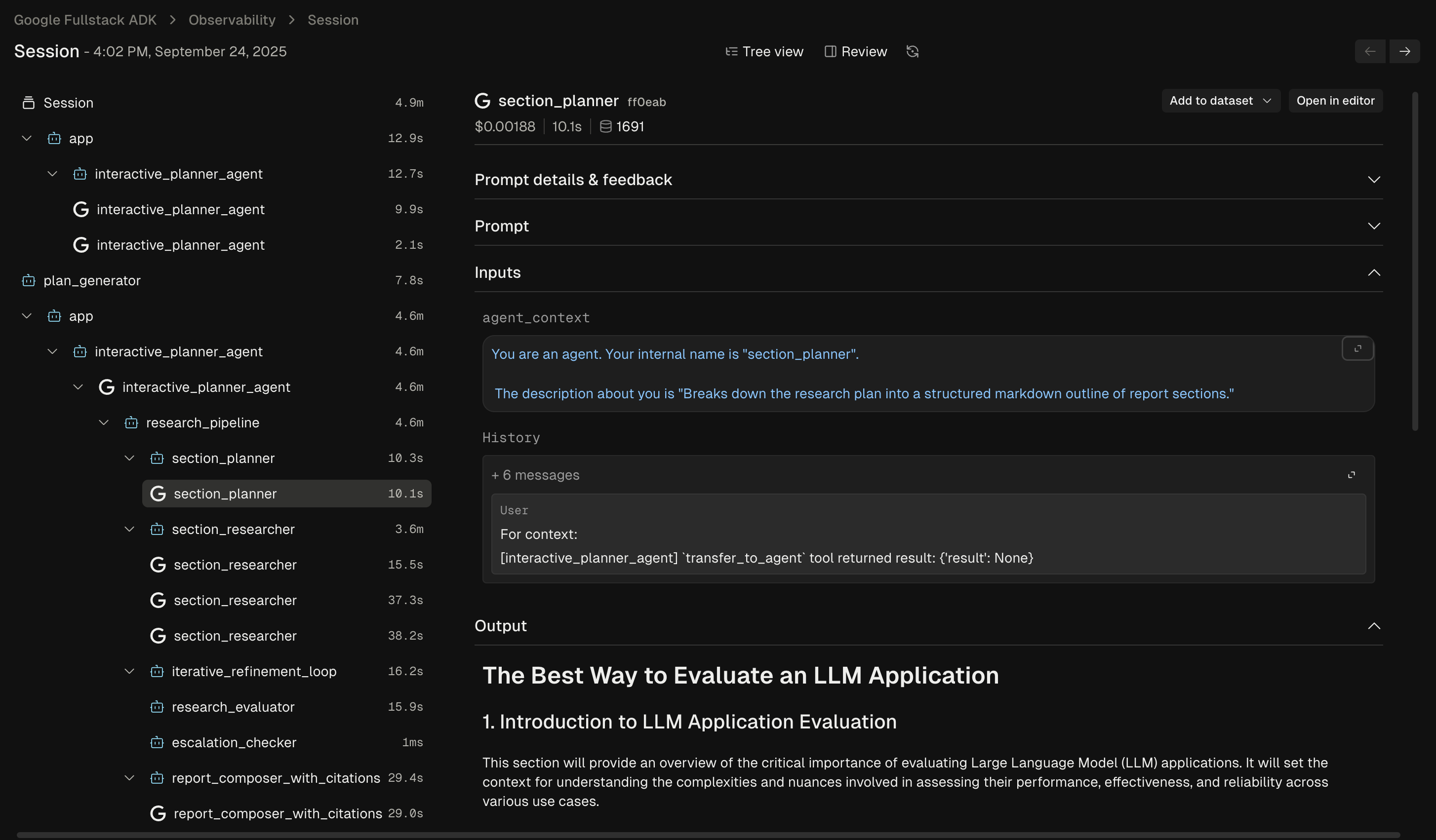
Freeplay's Observability feature gives you a clear view into how your agent is behaving in production. You can dig into individual agent traces to understand each step and diagnose issues:
Freeplay 的可观测性功能让您清楚地了解智能体在生产环境中的行为。您可以深入查看单个智能体跟踪,了解每个步骤并诊断问题:
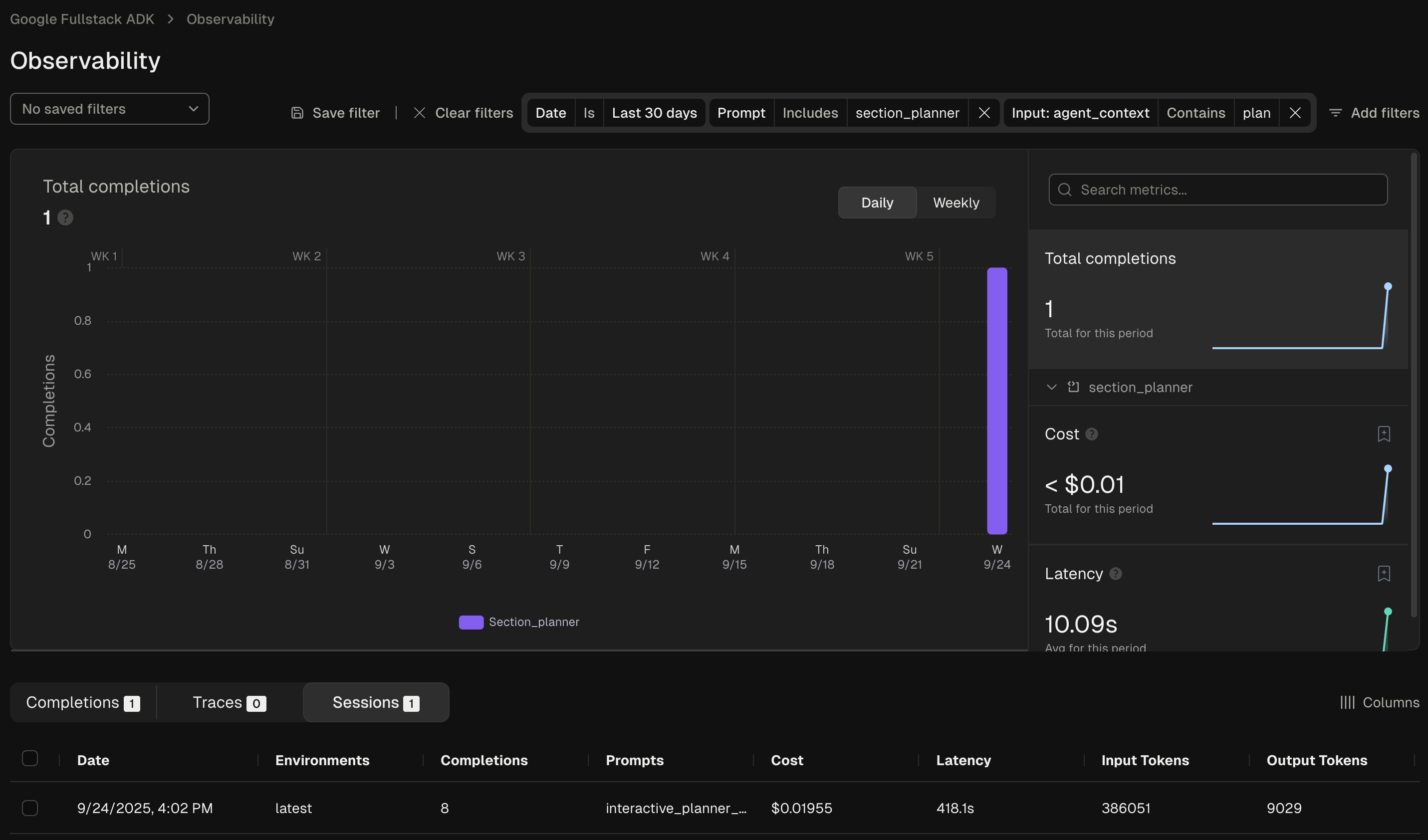
You can also use Freeplay's filtering functionality to search and filter the data across any segment of interest:
您还可以使用 Freeplay 的过滤功能搜索和过滤任何感兴趣的数据段:
Prompt Management (optional)
提示词管理(可选)
Freeplay offers native prompt management, which simplifies the process of version and testing different prompt versions. It allows you to experiment with changes to ADK agent instructions in the Freeplay UI, test different models, and push updates straight to your code, similar to a feature flag.
Freeplay 提供原生提示词管理,简化了版本控制和测试不同提示词版本的过程。它允许您在 Freeplay UI 中实验 ADK 智能体指令的变更,测试不同的模型,并将更新直接推送到代码中,类似于功能标志。
To leverage Freeplay's prompt management capabilities alongside ADK, you'll want
to use the Freeplay ADK agent wrapper. FreeplayLLMAgent extends ADK's base
LlmAgent class, so instead of having to hard code your prompts as agent
instructions, you can version prompts in the Freeplay application.
要结合使用 ADK 利用 Freeplay 的提示词管理功能,您需要使用 Freeplay ADK 智能体包装器。FreeplayLLMAgent 扩展了 ADK 的基础 LlmAgent 类,因此您无需将提示词硬编码为智能体指令,而是在 Freeplay 应用程序中对提示词进行版本控制。
First define a prompt in Freeplay by going to Prompts -> Create prompt template:
首先通过转到 Prompts -> Create prompt template 在 Freeplay 中定义提示词:
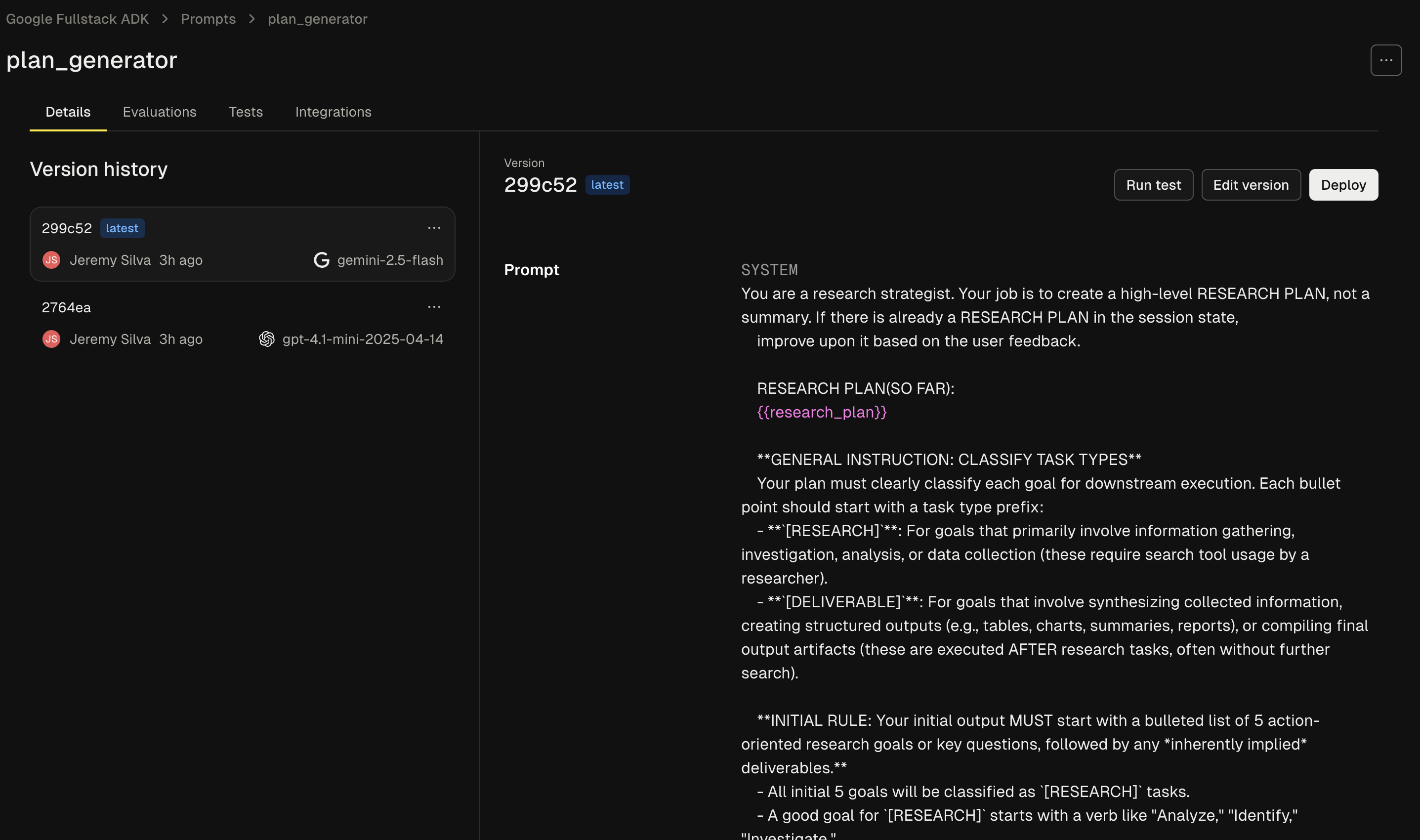
When creating your prompt template you'll need to add 3 elements, as described in the following sections:
创建提示词模板时,您需要添加 3 个元素,如以下章节所述:
System Message
系统消息
This corresponds to the "instructions" section in your code.
这对应于代码中的 "instructions" 部分。
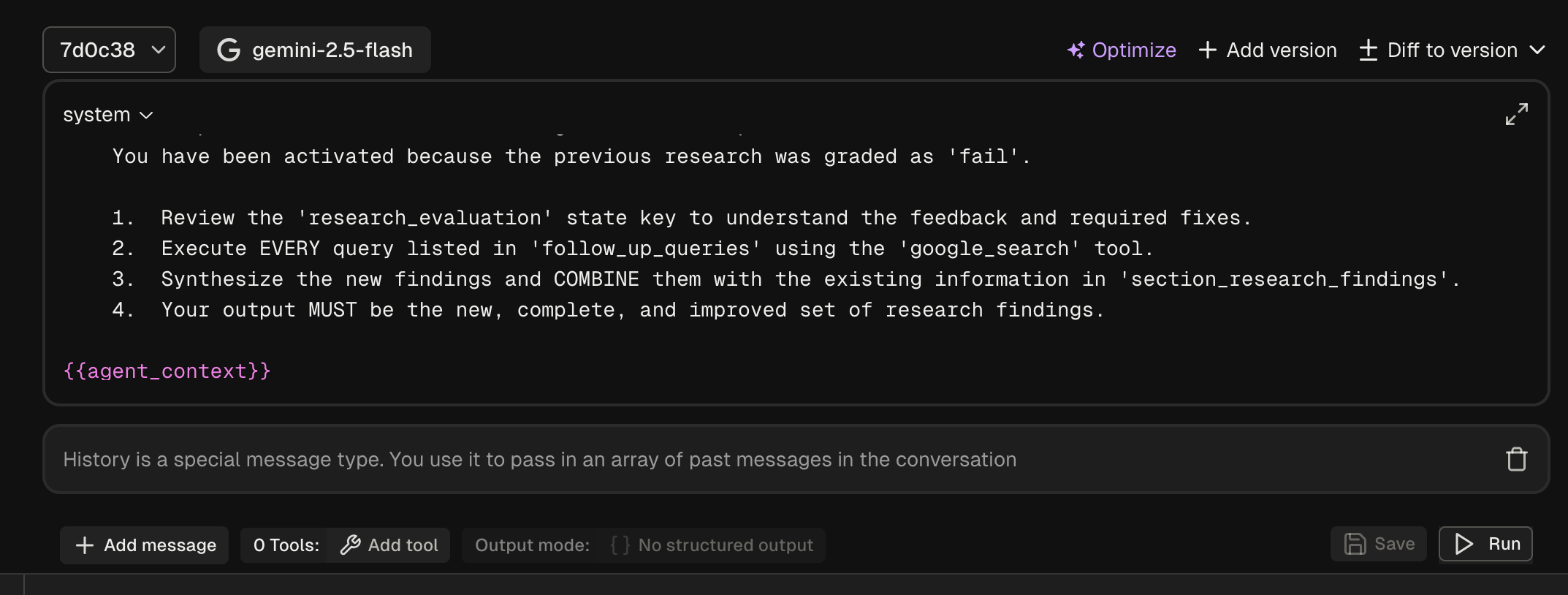
Agent Context Variable
智能体上下文变量
Adding the following to the bottom of your system message will create a variable for the ongoing agent context to be passed through:
在系统消息底部添加以下内容将创建一个变量,用于传递持续进行的智能体上下文:
History Block
历史记录块
Click new message and change the role to 'history'. This will ensure the past messages are passed through when present.
点击新消息并将角色更改为 'history'。这将确保过去的消息在存在时被传递。
Now in your code you can use the FreeplayLLMAgent:
现在您可以在代码中使用 FreeplayLLMAgent:
from freeplay_python_adk.client import FreeplayADK
from freeplay_python_adk.freeplay_llm_agent import (
    FreeplayLLMAgent,
)

FreeplayADK.initialize_observability()

root_agent = FreeplayLLMAgent(
    name="social_product_researcher",
    tools=[tavily_search],
)
When the social_product_researcher is invoked, the prompt will be
retrieved from Freeplay and formatted with the proper input variables.
当调用 social_product_researcher 时,将从 Freeplay 检索提示词并使用正确的输入变量进行格式化。
Evaluation
评估
Freeplay enables you to define, version, and run evaluations from the Freeplay web application. You can define evaluations for any of your prompts or agents by going to Evaluations -> "New evaluation".
Freeplay 使您能够从 Freeplay Web 应用程序定义、版本控制和运行评估。您可以通过转到 Evaluations -> "New evaluation" 来为任何提示词或智能体定义评估。
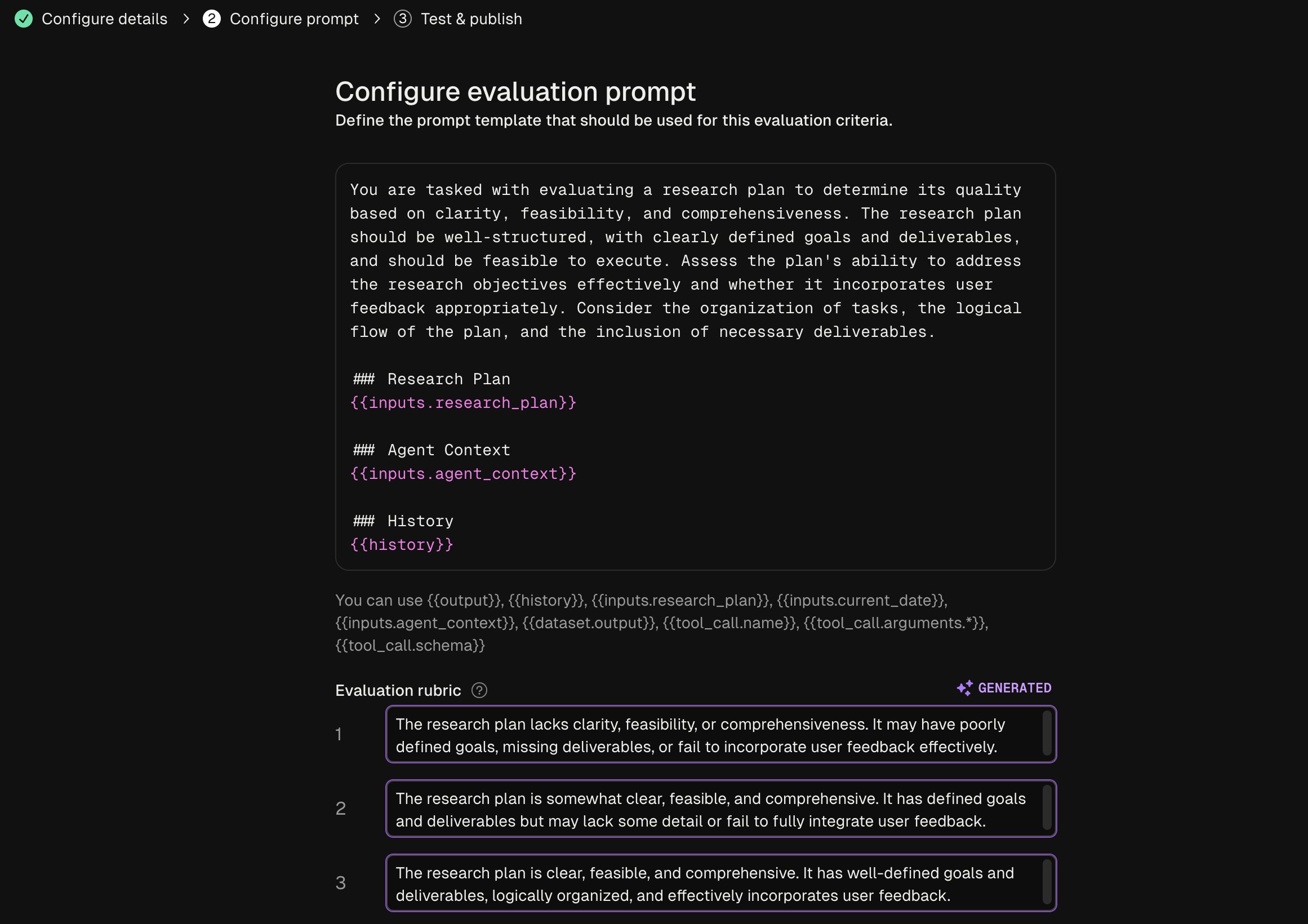
These evaluations can be configured to run for both online monitoring and offline evaluation. Datasets for offline evaluation can be uploaded to Freeplay or saved from log examples.
这些评估可以配置为同时运行在线监控和离线评估。离线评估的数据集可以上传到 Freeplay 或从日志示例中保存。
Dataset Management
数据集管理
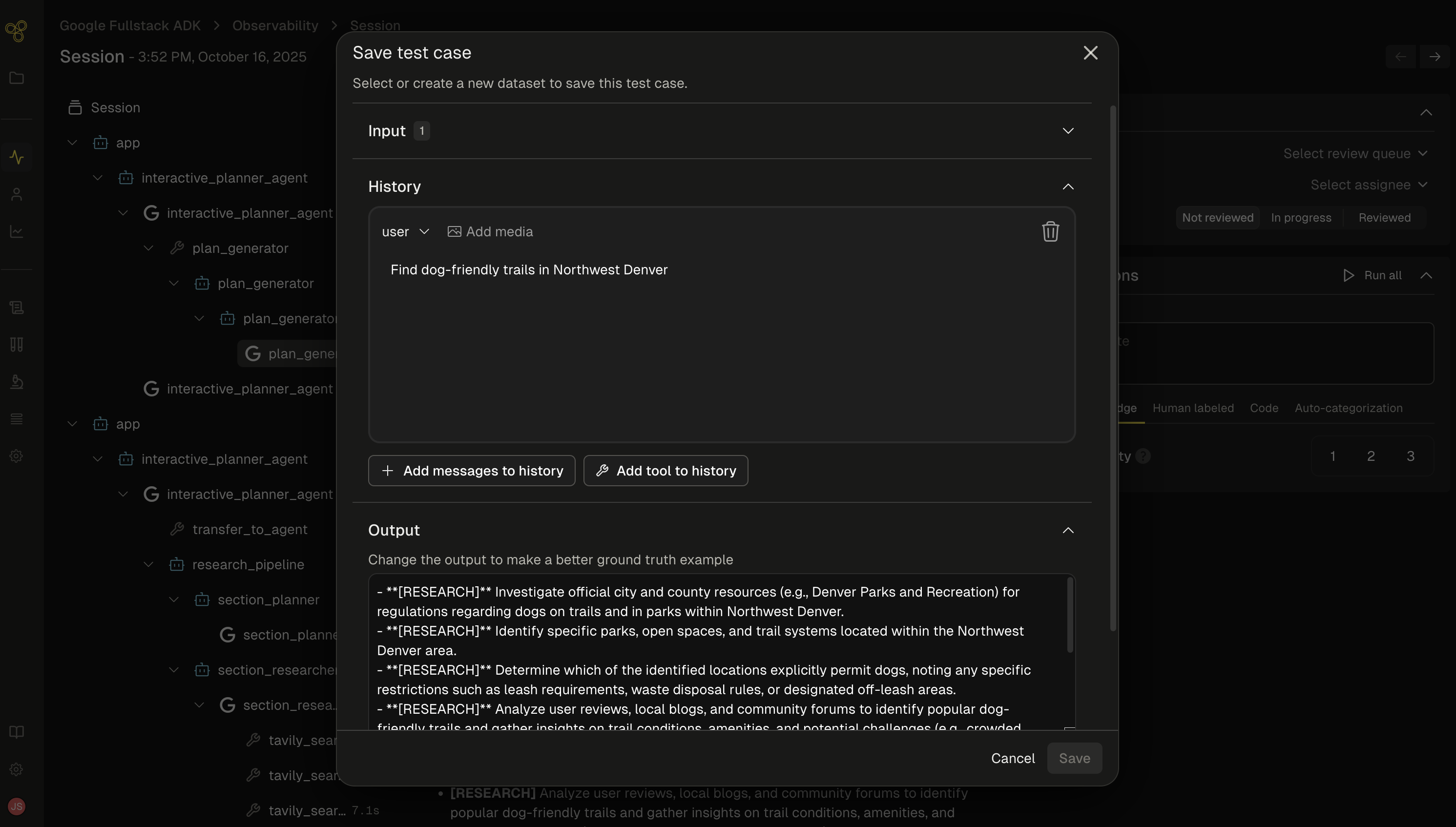
As you get data flowing into Freeplay, you can use these logs to start building up datasets to test against on a repeated basis. Use production logs to create golden datasets or collections of failure cases that you can use to test against as you make changes.
随着数据流入 Freeplay,您可以使用这些日志开始构建数据集进行重复测试。使用生产日志创建黄金数据集或失败案例集合,您可以在进行更改时使用它们进行测试。
Batch Testing
批量测试
As you iterate on your agent, you can run batch tests (i.e., offline experiments) at both the prompt and end-to-end agent level. This allows you to compare multiple different models or prompt changes and quantify changes head to head across your full agent execution.
在迭代智能体时,您可以在提示词和端到端智能体级别运行批量测试(即离线实验)。这使您能够比较多个不同的模型或提示词变更,并在完整的智能体执行过程中量化变更的直接对比。
Here is a code example for executing a batch test on Freeplay with ADK.
这里是一个使用 ADK 在 Freeplay 上执行批量测试的代码示例。
Sign up now
立即注册
Go to Freeplay to sign up for an account, and check out a full Freeplay <> ADK Integration here