Agent Observability with Weave by WandB
使用 WandB 的 Weave 进行智能体可观测性
Weave by Weights & Biases (WandB) provides a powerful platform for logging and visualizing model calls. By integrating Google ADK with Weave, you can track and analyze your agent's performance and behavior using OpenTelemetry (OTEL) traces.
WandB 的 Weave 提供了一个强大的平台,用于记录和可视化模型调用。通过将 Google ADK 与 Weave 集成,您可以使用 OpenTelemetry (OTEL) 跟踪来跟踪和分析智能体的性能和行为。
Prerequisites
先决条件
- Sign up for an account at WandB.
-
在 WandB 注册一个账户。
-
Obtain your API key from WandB Authorize.
-
从 WandB Authorize 获取您的 API 密钥。
-
Configure your environment with required API keys:
- 使用所需的 API 密钥配置您的环境:
Install Dependencies
安装依赖项
Ensure you have necessary packages installed:
确保您安装了必要的包:
Sending Traces to Weave
将跟踪发送到 Weave
This example demonstrates how to configure OpenTelemetry to send Google ADK traces to Weave.
此示例演示如何配置 OpenTelemetry 以将 Google ADK 跟踪发送到 Weave。
# math_agent/agent.py

import base64
import os
from opentelemetry.exporter.otlp.proto.http.trace_exporter import OTLPSpanExporter
from opentelemetry.sdk import trace as trace_sdk
from opentelemetry.sdk.trace.export import SimpleSpanProcessor
from opentelemetry import trace

from google.adk.agents import LlmAgent
from google.adk.tools import FunctionTool

from dotenv import load_dotenv

load_dotenv()

# Configure Weave endpoint and authentication
# 配置 Weave 端点和身份验证
WANDB_BASE_URL = "https://trace.wandb.ai"
PROJECT_ID = "your-entity/your-project"  # e.g., "teamid/projectid" / 例如,"teamid/projectid"
OTEL_EXPORTER_OTLP_ENDPOINT = f"{WANDB_BASE_URL}/otel/v1/traces"

# Set up authentication
# 设置身份验证
WANDB_API_KEY = os.getenv("WANDB_API_KEY")
AUTH = base64.b64encode(f"api:{WANDB_API_KEY}".encode()).decode()

OTEL_EXPORTER_OTLP_HEADERS = {
    "Authorization": f"Basic {AUTH}",
    "project_id": PROJECT_ID,
}

# Create the OTLP span exporter with endpoint and headers
# 使用端点和头部创建 OTLP span 导出器
exporter = OTLPSpanExporter(
    endpoint=OTEL_EXPORTER_OTLP_ENDPOINT,
    headers=OTEL_EXPORTER_OTLP_HEADERS,
)

# Create a tracer provider and add the exporter
# 创建跟踪器提供程序并添加导出器
tracer_provider = trace_sdk.TracerProvider()
tracer_provider.add_span_processor(SimpleSpanProcessor(exporter))

# Set the global tracer provider BEFORE importing/using ADK
# 在导入/使用 ADK 之前设置全局跟踪器提供程序
trace.set_tracer_provider(tracer_provider)

# Define a simple tool for demonstration
# 定义一个简单的工具用于演示
def calculator(a: float, b: float) -> str:
    """Add two numbers and return result.

    Args:
        a: First number
        b: Second number

    Returns:
        The sum of a and b
    """
    return str(a + b)

calculator_tool = FunctionTool(func=calculator)

# Create an LLM agent
# 创建一个 LLM 智能体
root_agent = LlmAgent(
    name="MathAgent",
    model="gemini-2.0-flash-exp",
    instruction=(
        "You are a helpful assistant that can do math. "
        "When asked a math problem, use calculator tool to solve it."
    ),
    tools=[calculator_tool],
)
View Traces in Weave dashboard
在 Weave 仪表板中查看跟踪
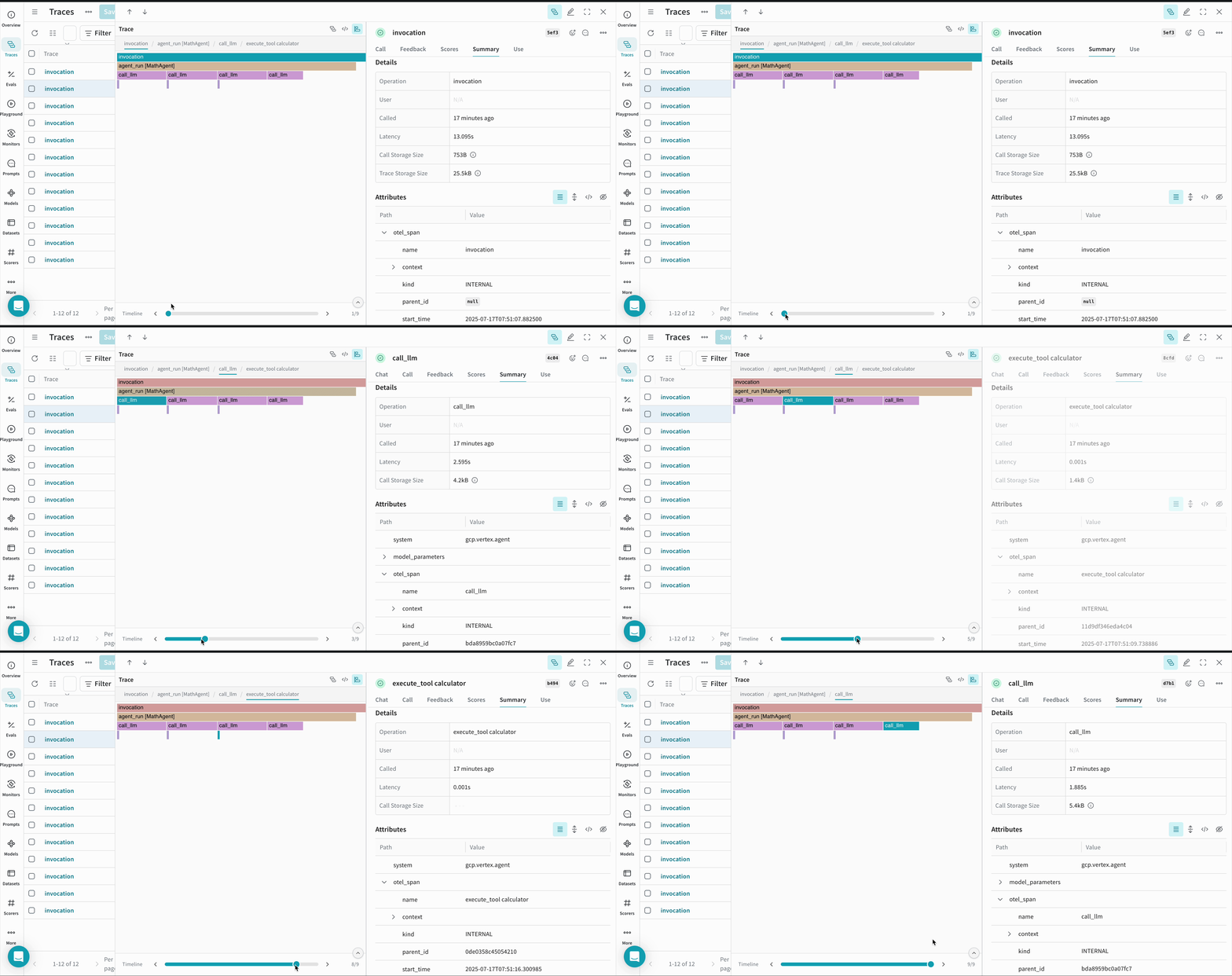
Once agent runs, all its traces are logged to corresponding project on the Weave dashboard.
一旦智能体运行,其所有跟踪都会记录到 Weave 仪表板上的相应项目中。
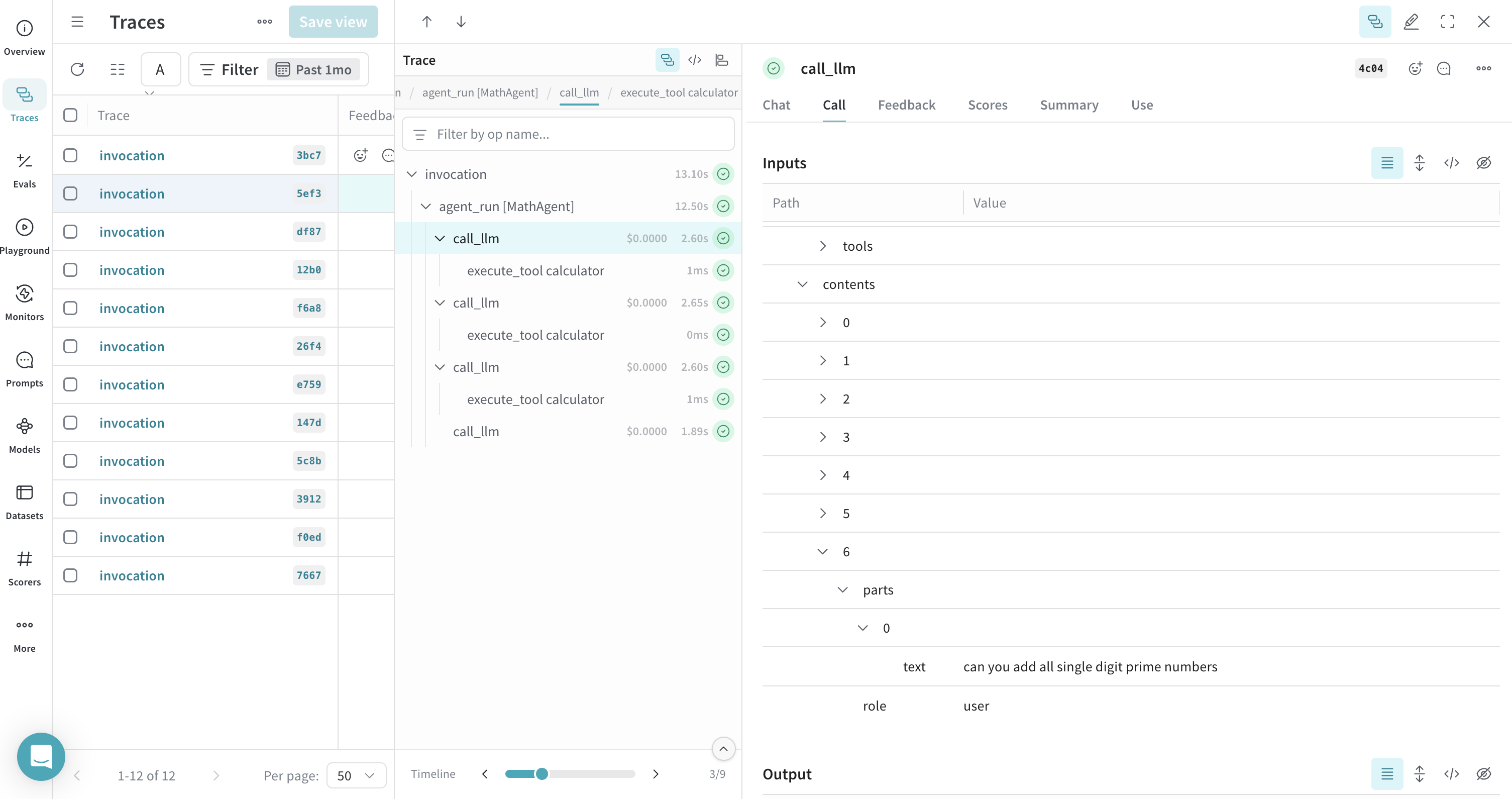
You can view a timeline of calls that your ADK agent made during execution -
您可以查看 ADK 智能体在执行期间进行的调用时间轴 -
Notes
注意事项
- Environment Variables: Ensure your environment variables are correctly set for both WandB and Google API keys.
- 环境变量: 确保为 WandB 和 Google API 密钥正确设置了环境变量。
- Project Configuration: Replace
<your-entity>/<your-project>with your actual WandB entity and project name. - 项目配置: 将
<your-entity>/<your-project>替换为您的实际 WandB 实体和项目名称。 - Entity Name: You can find your entity name by visiting your WandB dashboard and checking the Teams field in left sidebar.
- 实体名称: 您可以通过访问您的 WandB 仪表板并检查左侧边栏中的 Teams 字段来查找您的实体名称。
- Tracer Provider: It's critical to set the global tracer provider before using any ADK components to ensure proper tracing.
- 跟踪器提供程序: 在使用任何 ADK 组件之前设置全局跟踪器提供程序对于确保正确跟踪至关重要。
By following these steps, you can effectively integrate Google ADK with Weave, enabling comprehensive logging and visualization of your AI agents' model calls, tool invocations, and reasoning processes.
按照这些步骤,您可以有效地将 Google ADK 与 Weave 集成,实现对 AI 智能体的模型调用、工具调用和推理过程的全面记录和可视化。
Resources
资源
- Send OpenTelemetry Traces to Weave - Comprehensive guide on configuring OTEL with Weave, including authentication and advanced configuration options.
-
将 OpenTelemetry 跟踪发送到 Weave - 使用 Weave 配置 OTEL 的综合指南,包括身份验证和高级配置选项。
-
Navigate to Trace View - Learn how to effectively analyze and debug your traces in Weave UI, including understanding trace hierarchies and span details.
-
导航到跟踪视图 - 了解如何在 Weave UI 中有效地分析和调试跟踪,包括理解跟踪层次结构和 span 详细信息。
-
Weave Integrations - Explore other framework integrations and see how Weave can work with your entire AI stack.
- Weave 集成 - 探索其他框架集成,并了解 Weave 如何与您的整个 AI 堆栈一起工作。