Authenticating with Tools
工具身份验证
Many tools need to access protected resources (like user data in Google Calendar, Salesforce records, etc.) and require authentication. ADK provides a system to handle various authentication methods securely.
许多工具需要访问受保护的资源(如 Google Calendar 中的用户数据、Salesforce 记录等)并需要身份验证。ADK 提供了一个安全处理各种身份验证方法的系统。
The key components involved are:
涉及的关键组件包括:
-
AuthScheme: Defines how an API expects authentication credentials (e.g., as an API Key in a header, an OAuth 2.0 Bearer token). ADK supports to same types of authentication schemes as OpenAPI 3.0. To know more about what each type of credential is, refer to OpenAPI doc: Authentication. ADK uses specific classes likeAPIKey,HTTPBearer,OAuth2,OpenIdConnectWithConfig. -
AuthScheme: 定义 API 如何 期望身份验证凭据(例如,作为标头中的 API Key、OAuth 2.0 Bearer 令牌)。ADK 支持与 OpenAPI 3.0 相同的身份验证方案类型。要了解每种凭据类型的更多信息,请参阅 OpenAPI 文档: 身份验证。ADK 使用特定的类,如APIKey、HTTPBearer、OAuth2、OpenIdConnectWithConfig。 -
AuthCredential: Holds the initial information needed to start the authentication process (e.g., your application's OAuth Client ID/Secret, an API key value). It includes anauth_type(likeAPI_KEY,OAUTH2,SERVICE_ACCOUNT) specifying the credential type. -
AuthCredential: 保存启动身份验证过程所需的初始信息(例如,您的应用程序的 OAuth 客户端 ID/密钥、API 密钥值)。它包括一个auth_type(如API_KEY、OAUTH2、SERVICE_ACCOUNT),用于指定凭据类型。
The general flow involves providing these details when configuring a tool. ADK then attempts to automatically exchange of initial credential for a usable one (like an access token) before the tool makes an API call. For flows requiring user interaction (like OAuth consent), a specific interactive process involving the Agent Client application is triggered.
一般流程包括在配置工具时提供这些详细信息。然后 ADK 尝试在工具进行 API 调用之前自动将初始凭据交换为可用的凭据(如访问令牌)。对于需要用户交互的流程(如 OAuth 同意),会触发一个涉及智能体客户端应用程序的特定交互式流程。
Supported Initial Credential Types
支持的初始凭据类型
-
API_KEY: For simple key/value authentication. Usually requires no exchange.
-
API_KEY: 用于简单的密钥/值身份验证。通常不需要交换。
-
HTTP: Can represent Basic Auth (not recommended/supported for exchange) or already obtained Bearer tokens. If it's a Bearer token, no exchange is needed.
-
HTTP: 可以表示基本身份验证(不推荐/不支持交换)或已获得的 Bearer 令牌。如果是 Bearer 令牌,则不需要交换。
-
OAUTH2: For standard OAuth 2.0 flows. Requires configuration (client ID, secret, scopes) and often triggers the interactive flow for user consent.
-
OAUTH2: 用于标准 OAuth 2.0 流程。需要配置(客户端 ID、密钥、作用域),并且通常会触发用户同意的交互式流程。
-
OPEN_ID_CONNECT: For authentication based on OpenID Connect. Similar to OAuth2, often requires configuration and user interaction.
-
OPEN_ID_CONNECT: 用于基于 OpenID Connect 的身份验证。与 OAuth2 类似,通常需要配置和用户交互。
-
SERVICE_ACCOUNT: For Google Cloud Service Account credentials (JSON key or Application Default Credentials). Typically exchanged for a Bearer token.
-
SERVICE_ACCOUNT: 用于 Google Cloud 服务账户凭据(JSON 密钥或应用程序默认凭据)。通常交换为 Bearer 令牌。
Configuring Authentication on Tools
配置工具的身份验证
You set up authentication when defining your tool:
在定义工具时,您需要设置身份验证:
-
RestApiTool / OpenAPIToolset: Pass
auth_schemeandauth_credentialduring initializationRestApiTool / OpenAPIToolset: 在初始化期间传递
auth_scheme和auth_credential -
GoogleApiToolSet Tools: ADK has built-in 1st party tools like Google Calendar, BigQuery etc,. Use the toolset's specific method.
GoogleApiToolSet 工具: ADK 拥有内置的 1st party 工具,如 Google Calendar、BigQuery 等。使用工具集的特定方法。
-
APIHubToolset / ApplicationIntegrationToolset: Pass
auth_schemeandauth_credentialduring initialization, if the API managed in API Hub / provided by Application Integration requires authentication.APIHubToolset / ApplicationIntegrationToolset: 在初始化期间传递
auth_scheme和auth_credential,如果 API Hub 中管理的 API / 由 Application Integration 提供的 API 需要身份验证。
WARNING
Storing sensitive credentials like access tokens and especially refresh tokens directly in the session state might pose security risks depending on your session storage backend (SessionService) and overall application security posture.
将访问令牌等敏感凭据(尤其是刷新令牌)直接存储在会话状态中可能会根据您的会话存储后端(SessionService)和整体应用程序安全态势带来安全风险。
-
InMemorySessionService: Suitable for testing and development, but data is lost when the process ends. Less risk as it's transient.InMemorySessionService: 适用于测试和开发,但进程结束时数据会丢失。风险较低,因为它是临时的。 -
Database/Persistent Storage: Strongly consider encrypting the token data before storing it in the database using a robust encryption library (like
cryptography) and managing encryption keys securely (e.g., using a key management service).数据库/持久化存储: 强烈考虑在使用强加密库(如
cryptography)将令牌数据存储到数据库之前进行加密,并安全地管理加密密钥(例如,使用密钥管理服务)。 -
Secure Secret Stores: For production environments, storing sensitive credentials in a dedicated secret manager (like Google Cloud Secret Manager or HashiCorp Vault) is the most recommended approach. Your tool could potentially store only short-lived access tokens or secure references (not the refresh token itself) in the session state, fetching the necessary secrets from the secure store when needed.
安全密钥存储: 对于生产环境,将敏感凭据存储在专用密钥管理器(如 Google Cloud Secret Manager 或 HashiCorp Vault)中是最推荐的方法。您的工具可能会在会话状态中仅存储短期的访问令牌或安全引用(而不是刷新令牌本身),并在需要时从安全存储中获取必要的密钥。
Journey 1: Building Agentic Applications with Authenticated Tools
旅程 1: 使用经过身份验证的工具构建智能体应用程序
This section focuses on using pre-existing tools (like those from RestApiTool/ OpenAPIToolset, APIHubToolset, GoogleApiToolSet) that require authentication within your agentic application. Your main responsibility is configuring the tools and handling the client-side part of interactive authentication flows (if required by the tool).
本节重点介绍在智能体应用程序中使用需要身份验证的预构建工具(如来自 RestApiTool/ OpenAPIToolset、APIHubToolset、GoogleApiToolSet 的工具)。您的主要责任是配置工具和处理交互式身份验证流程的客户端部分(如果工具需要)。
1. Configuring Tools with Authentication
1. 配置工具的身份验证
When adding an authenticated tool to your agent, you need to provide its required AuthScheme and your application's initial AuthCredential.
在向智能体添加经过身份验证的工具时,您需要提供其所需的 AuthScheme 和应用程序的初始 AuthCredential。
A. Using OpenAPI-based Toolsets (OpenAPIToolset, APIHubToolset, etc.)
A. 使用基于 OpenAPI 的工具集(OpenAPIToolset、APIHubToolset 等)
Pass the scheme and credential during toolset initialization. The toolset applies them to all generated tools. Here are few ways to create tools with authentication in ADK.
在工具集初始化期间传递方案和凭据。工具集将它们应用于所有生成的工具。以下是在 ADK 中创建带身份验证的工具的几种方法。
API Key
Create a tool requiring an API Key.
创建需要 API Key 的工具。
from google.adk.tools.openapi_tool.auth.auth_helpers import token_to_scheme_credential
from google.adk.tools.openapi_tool.openapi_spec_parser.openapi_toolset import OpenAPIToolset

auth_scheme, auth_credential = token_to_scheme_credential(
    "apikey", "query", "apikey", "YOUR_API_KEY_STRING"
)
sample_api_toolset = OpenAPIToolset(
    spec_str="...",  # Fill this with an OpenAPI spec string
    spec_str_type="yaml",
    auth_scheme=auth_scheme,
    auth_credential=auth_credential,
)
OAuth2
Create a tool requiring OAuth2.
创建需要 OAuth2 的工具。
from google.adk.tools.openapi_tool.openapi_spec_parser.openapi_toolset import OpenAPIToolset
from fastapi.openapi.models import OAuth2
from fastapi.openapi.models import OAuthFlowAuthorizationCode
from fastapi.openapi.models import OAuthFlows
from google.adk.auth import AuthCredential
from google.adk.auth import AuthCredentialTypes
from google.adk.auth import OAuth2Auth

auth_scheme = OAuth2(
    flows=OAuthFlows(
        authorizationCode=OAuthFlowAuthorizationCode(
            authorizationUrl="https://accounts.google.com/o/oauth2/auth",
            tokenUrl="https://oauth2.googleapis.com/token",
            scopes={
                "https://www.googleapis.com/auth/calendar": "calendar scope"
            },
        )
    )
)
auth_credential = AuthCredential(
    auth_type=AuthCredentialTypes.OAUTH2,
    oauth2=OAuth2Auth(
        client_id=YOUR_OAUTH_CLIENT_ID,
        client_secret=YOUR_OAUTH_CLIENT_SECRET
    ),
)

calendar_api_toolset = OpenAPIToolset(
    spec_str=google_calendar_openapi_spec_str, # Fill this with an openapi spec
    spec_str_type='yaml',
    auth_scheme=auth_scheme,
    auth_credential=auth_credential,
)
服务账户
Create a tool requiring Service Account.
创建需要服务账户的工具。
from google.adk.tools.openapi_tool.auth.auth_helpers import service_account_dict_to_scheme_credential
from google.adk.tools.openapi_tool.openapi_spec_parser.openapi_toolset import OpenAPIToolset

service_account_cred = json.loads(service_account_json_str)
auth_scheme, auth_credential = service_account_dict_to_scheme_credential(
    config=service_account_cred,
    scopes=["https://www.googleapis.com/auth/cloud-platform"],
)
sample_toolset = OpenAPIToolset(
    spec_str=sa_openapi_spec_str, # Fill this with an openapi spec
    spec_str_type='json',
    auth_scheme=auth_scheme,
    auth_credential=auth_credential,
)
OpenID Connect
Create a tool requiring OpenID connect.
创建需要 OpenID Connect 的工具。
from google.adk.auth.auth_schemes import OpenIdConnectWithConfig
from google.adk.auth.auth_credential import AuthCredential, AuthCredentialTypes, OAuth2Auth
from google.adk.tools.openapi_tool.openapi_spec_parser.openapi_toolset import OpenAPIToolset

auth_scheme = OpenIdConnectWithConfig(
    authorization_endpoint=OAUTH2_AUTH_ENDPOINT_URL,
    token_endpoint=OAUTH2_TOKEN_ENDPOINT_URL,
    scopes=['openid', 'YOUR_OAUTH_SCOPES"]
)
auth_credential = AuthCredential(
    auth_type=AuthCredentialTypes.OPEN_ID_CONNECT,
    oauth2=OAuth2Auth(
        client_id="...",
        client_secret="...",
    )
)

userinfo_toolset = OpenAPIToolset(
    spec_str=content, # Fill in an actual spec
    spec_str_type='yaml',
    auth_scheme=auth_scheme,
    auth_credential=auth_credential,
)
B. Using Google API Toolsets (e.g., calendar_tool_set)
B. 使用 Google API 工具集(例如 calendar_tool_set)
These toolsets often have dedicated configuration methods.
这些工具集通常有专用的配置方法。
Tip: For how to create a Google OAuth Client ID & Secret, see this guide: Get your Google API Client ID
提示: 有关如何创建 Google OAuth 客户端 ID 和密钥的信息,请参阅此指南: 获取您的 Google API 客户端 ID
# Example: Configuring Google Calendar Tools
# 示例:配置 Google Calendar 工具
from google.adk.tools.google_api_tool import calendar_tool_set

client_id = "YOUR_GOOGLE_OAUTH_CLIENT_ID.apps.googleusercontent.com"
client_secret = "YOUR_GOOGLE_OAUTH_CLIENT_SECRET"

# Use the specific configure method for this toolset type
# 使用此工具集类型的特定配置方法
calendar_tool_set.configure_auth(
    client_id=oauth_client_id, client_secret=oauth_client_secret
)

# agent = LlmAgent(..., tools=calendar_tool_set.get_tool('calendar_tool_set'))
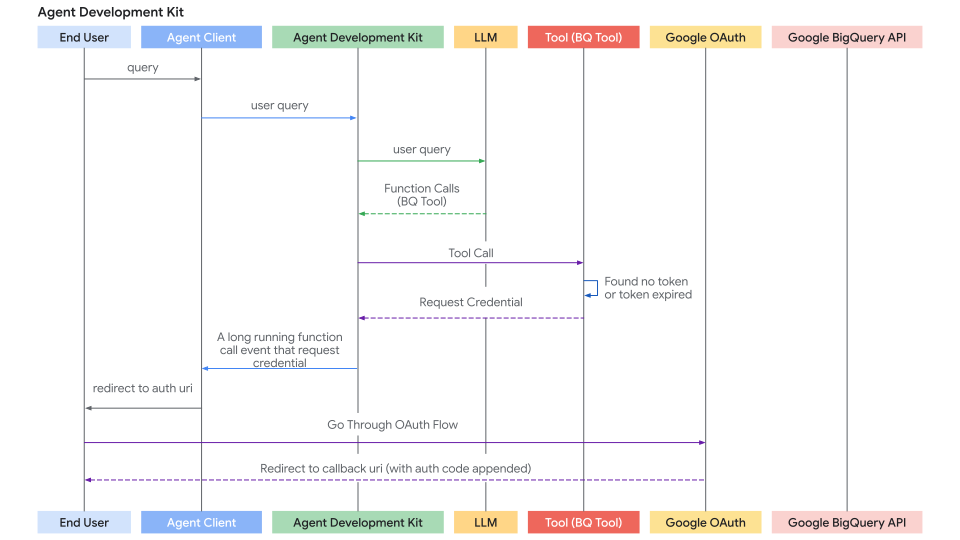
The sequence diagram of auth request flow (where tools are requesting auth credentials) looks like below:
身份验证请求流程(其中工具请求身份验证凭据)的时序图如下所示:
2. Handling the Interactive OAuth/OIDC Flow (Client-Side)
2. 处理交互式 OAuth/OIDC 流程(客户端)
If a tool requires user login/consent (typically OAuth 2.0 or OIDC), the ADK framework pauses execution and signals your Agent Client application. There are two cases:
如果工具需要用户登录/同意(通常是 OAuth 2.0 或 OIDC),ADK 框架会暂停执行并向您的 Agent Client 应用程序发出信号。有两种情况:
-
Agent Client application runs the agent directly (via
runner.run_async) in the same process. e.g. UI backend, CLI app, or Spark job etc.Agent Client 应用程序在同一进程中直接运行智能体(通过
runner.run_async)。例如,UI 后端、CLI 应用程序或 Spark 作业等。 -
Agent Client application interacts with ADK's fastapi server via
/runor/run_sseendpoint. While ADK's fastapi server could be setup on the same server or different server as Agent Client applicationAgent Client 应用程序通过
/run或/run_sse端点与 ADK 的 fastapi 服务器交互。虽然 ADK 的 fastapi 服务器可以设置在与 Agent Client 应用程序相同的服务器或不同的服务器上
The second case is a special case of first case, because /run or /run_sse endpoint also invokes runner.run_async. The only differences are:
第二种情况是第一种情况的一种特殊情况,因为 /run 或 /run_sse 端点也会调用 runner.run_async。唯一的区别是:
-
Whether to call a python function to run the agent (first case) or call a service endpoint to run the agent (second case).
是调用 python 函数来运行智能体(第一种情况)还是调用服务端点来运行智能体(第二种情况)。
-
Whether the result events are in-memory objects (first case) or serialized json string in http response (second case).
结果事件是内存对象(第一种情况)还是 http 响应中的序列化 json 字符串(第二种情况)。
Below sections focus on the first case and you should be able to map it to the second case very straightforward. We will also describe some differences to handle for the second case if necessary.
以下部分重点介绍第一种情况,您应该能够非常直接地将其映射到第二种情况。如果需要,我们还将描述第二种情况需要处理的一些差异。
Here's the step-by-step process for your client application:
以下是您的客户端应用程序的分步流程:
Step 1: Run Agent & Detect Auth Request
步骤 1: 运行智能体并检测身份验证请求
-
Initiate the agent interaction using
runner.run_async.使用
runner.run_async启动智能体交互。 -
Iterate through the yielded events.
遍历生成的事件。
-
Look for a specific function call event whose function call has a special name:
adk_request_credential. This event signals that user interaction is needed. You can use helper functions to identify this event and extract necessary information. (For the second case, the logic is similar. You deserialize the event from the http response).查找特定的函数调用事件,该事件的函数调用具有特殊名称:
adk_request_credential。此事件表示需要用户交互。您可以使用辅助函数来识别此事件并提取必要的信息。(对于第二种情况,逻辑类似。您从 http 响应中反序列化事件)。
# runner = Runner(...)
# session = await session_service.create_session(...)
# content = types.Content(...) # User's initial query

print("\nRunning agent...")
events_async = runner.run_async(
    session_id=session.id, user_id='user', new_message=content
)

auth_request_function_call_id, auth_config = None, None

async for event in events_async:
    # Use helper to check for the specific auth request event
    # 使用辅助函数检查特定的身份验证请求事件
    if (auth_request_function_call := get_auth_request_function_call(event)):
        print("--> Authentication required by agent.")
        # Store the ID needed to respond later
        # 存储稍后响应所需的 ID
        if not (auth_request_function_call_id := auth_request_function_call.id):
            raise ValueError(f'Cannot get function call id from function call: {auth_request_function_call}')
        # Get the AuthConfig containing the auth_uri etc.
        # 获取包含 auth_uri 等的 AuthConfig
        auth_config = get_auth_config(auth_request_function_call)
        break # Stop processing events for now, need user interaction
        # 停止处理事件,需要用户交互

if not auth_request_function_call_id:
    print("\nAuth not required or agent finished.")
    # return # Or handle final response if received
    # 返回 # 或处理收到的最终响应
Helper functions helpers.py:
辅助函数 helpers.py:
from google.adk.events import Event
from google.adk.auth import AuthConfig # Import necessary type
from google.genai import types

def get_auth_request_function_call(event: Event) -> types.FunctionCall:
    # Get the special auth request function call from the event
    # 从事件中获取特殊的身份验证请求函数调用
    if not event.content or not event.content.parts:
        return
    for part in event.content.parts:
        if (
            part
            and part.function_call
            and part.function_call.name == 'adk_request_credential'
            and event.long_running_tool_ids
            and part.function_call.id in event.long_running_tool_ids
        ):

            return part.function_call

def get_auth_config(auth_request_function_call: types.FunctionCall) -> AuthConfig:
    # Extracts the AuthConfig object from the arguments of the auth request function call
    # 从身份验证请求函数调用的参数中提取 AuthConfig 对象
    if not auth_request_function_call.args or not (auth_config := auth_request_function_call.args.get('authConfig')):
        raise ValueError(f'Cannot get auth config from function call: {auth_request_function_call}')
    if isinstance(auth_config, dict):
        auth_config = AuthConfig.model_validate(auth_config)
    elif not isinstance(auth_config, AuthConfig):
        raise ValueError(f'Cannot get auth config {auth_config} is not an instance of AuthConfig.')
    return auth_config
Step 2: Redirect User for Authorization
步骤 2: 重定向用户进行授权
-
Get the authorization URL (
auth_uri) from theauth_configextracted in the previous step.从上一步中提取的
auth_config中获取授权 URL (auth_uri)。 -
Crucially, append your application's redirect_uri as a query parameter to this
auth_uri. Thisredirect_urimust be pre-registered with your OAuth provider (e.g., Google Cloud Console, Okta admin panel).关键在于,将您应用程序的 redirect_uri 作为查询参数附加到此
auth_uri。此redirect_uri必须在您的 OAuth 提供商处预先注册(例如,Google Cloud Console、Okta 管理面板)。 -
Direct the user to this complete URL (e.g., open it in their browser).
将用户定向到此完整的 URL(例如,在他们的浏览器中打开它)。
# (Continuing after detecting auth needed)
# (在检测到需要身份验证后继续)

if auth_request_function_call_id and auth_config:
    # Get the base authorization URL from the AuthConfig
    # 从 AuthConfig 获取基本授权 URL
    base_auth_uri = auth_config.exchanged_auth_credential.oauth2.auth_uri

    if base_auth_uri:
        redirect_uri = 'http://localhost:8000/callback' # MUST match your OAuth client app config
        # 必须与您的 OAuth 客户端应用程序配置匹配
        # Append redirect_uri (use urlencode in production)
        # 附加 redirect_uri(在生产环境中使用 urlencode)
        auth_request_uri = base_auth_uri + f'&redirect_uri={redirect_uri}'
        # Now you need to redirect your end user to this auth_request_uri or ask them to open this auth_request_uri in their browser
        # This auth_request_uri should be served by the corresponding auth provider and the end user should login and authorize your applicaiton to access their data
        # And then the auth provider will redirect the end user to the redirect_uri you provided
        # Next step: Get this callback URL from the user (or your web server handler)
        # 现在您需要将最终用户重定向到此 auth_request_uri 或要求他们在浏览器中打开此 auth_request_uri
        # 此 auth_request_uri 应由相应的身份验证提供商提供服务,最终用户应登录并授权您的应用程序访问其数据
        # 然后身份验证提供商将最终用户重定向到您提供的 redirect_uri
        # 下一步:从用户(或您的 Web 服务器处理程序)获取此回调 URL
    else:
         print("ERROR: Auth URI not found in auth_config.")
         # Handle error
         # 处理错误
Step 3. Handle the Redirect Callback (Client):
步骤 3. 处理重定向回调(客户端):
-
Your application must have a mechanism (e.g., a web server route at the
redirect_uri) to receive the user after they authorize the application with the provider.您的应用程序必须有一种机制(例如,位于
redirect_uri的 Web 服务器路由)来接收用户在提供商处授权应用程序后返回的用户。 -
The provider redirects the user to your
redirect_uriand appends anauthorization_code(and potentiallystate,scope) as query parameters to the URL.提供商将用户重定向到您的
redirect_uri,并将authorization_code(以及可能的state、scope)作为查询参数附加到 URL。 -
Capture the full callback URL from this incoming request.
从此传入请求中捕获完整的回调 URL。
-
(This step happens outside the main agent execution loop, in your web server or equivalent callback handler.)
(此步骤发生在主智能体执行循环之外,在您的 Web 服务器或等效的回调处理程序中。)
Step 4. Send Authentication Result Back to ADK (Client):
步骤 4. 将身份验证结果发送回 ADK(客户端):
-
Once you have the full callback URL (containing the authorization code), retrieve the
auth_request_function_call_idand theauth_configobject saved in Client Step 1.一旦您拥有完整的回调 URL(包含授权代码),检索在客户端步骤 1 中保存的
auth_request_function_call_id和auth_config对象。 -
Set the captured callback URL into the
exchanged_auth_credential.oauth2.auth_response_urifield. Also ensureexchanged_auth_credential.oauth2.redirect_uricontains the redirect URI you used.将捕获的回调 URL 设置到
exchanged_auth_credential.oauth2.auth_response_uri字段中。还要确保exchanged_auth_credential.oauth2.redirect_uri包含您使用的重定向 URI。 -
Create a
types.Contentobject containing atypes.Partwith atypes.FunctionResponse.创建一个包含带有
types.FunctionResponse的types.Part的types.Content对象。-
Set
nameto"adk_request_credential". (Note: This is a special name for ADK to proceed with authentication. Do not use other names.)将
name设置为"adk_request_credential"。(注意:这是 ADK 继续进行身份验证的特殊名称。请勿使用其他名称。) -
Set
idto theauth_request_function_call_idyou saved.将
id设置为您保存的auth_request_function_call_id。 -
Set
responseto the serialized (e.g.,.model_dump()) updatedAuthConfigobject.将
response设置为序列化的(例如,.model_dump())更新的AuthConfig对象。
-
-
Call
runner.run_asyncagain for the same session, passing thisFunctionResponsecontent as thenew_message.为同一会话再次调用
runner.run_async,将此FunctionResponse内容作为new_message传递。
# (Continuing after user interaction)
# (用户交互后继续)

    # Simulate getting the callback URL (e.g., from user paste or web handler)
    # 模拟获取回调 URL(例如,从用户粘贴或 Web 处理程序)
    auth_response_uri = await get_user_input(
        f'Paste the full callback URL here:\n> '
    )
    auth_response_uri = auth_response_uri.strip() # Clean input
    # 清理输入

    if not auth_response_uri:
        print("Callback URL not provided. Aborting.")
        return

    # Update the received AuthConfig with the callback details
    # 使用回调详细信息更新接收的 AuthConfig
    auth_config.exchanged_auth_credential.oauth2.auth_response_uri = auth_response_uri
    # Also include the redirect_uri used, as the token exchange might need it
    # 还包括使用的 redirect_uri,因为令牌交换可能需要它
    auth_config.exchanged_auth_credential.oauth2.redirect_uri = redirect_uri

    # Construct the FunctionResponse Content object
    # 构造 FunctionResponse 内容对象
    auth_content = types.Content(
        role='user', # Role can be 'user' when sending a FunctionResponse
        # 发送 FunctionResponse 时,角色可以是 'user'
        parts=[
            types.Part(
                function_response=types.FunctionResponse(
                    id=auth_request_function_call_id,       # Link to the original request
                    # 链接到原始请求
                    name='adk_request_credential', # Special framework function name
                    # 特殊框架函数名称
                    response=auth_config.model_dump() # Send back the *updated* AuthConfig
                    # 发回*更新的* AuthConfig
                )
            )
        ],
    )

    # --- Resume Execution ---
    # --- 恢复执行 ---
    print("\nSubmitting authentication details back to the agent...")
    events_async_after_auth = runner.run_async(
        session_id=session.id,
        user_id='user',
        new_message=auth_content, # Send the FunctionResponse back
        # 发回 FunctionResponse
    )

    # --- Process Final Agent Output ---
    # --- 处理最终智能体输出 ---
    print("\n--- Agent Response after Authentication ---")
    async for event in events_async_after_auth:
        # Process events normally, expecting the tool call to succeed now
        # 正常处理事件,预期工具调用现在会成功
        print(event) # Print the full event for inspection
        # 打印完整事件以供检查
Note: Authorization response with Resume feature
注意:使用 Resume 功能的授权响应
If your ADK agent workflow is configured with the
Resume feature, you also must include
the Invocation ID (invocation_id) parameter with the authorization
response. The Invocation ID you provide must be the same invocation
that generated the authorization request, otherwise the system
starts a new invocation with the authorization response. If your
agent uses the Resume feature, consider including the Invocation ID
as a parameter with your authorization request, so it can be included
with the authorization response. For more details on using the Resume
feature, see
Resume stopped agents.
如果您的 ADK 智能体工作流配置了
Resume 功能,您还必须在授权响应中包含
调用 ID (invocation_id) 参数。您提供的调用 ID 必须与生成
授权请求的调用相同,否则系统
将使用授权响应启动新调用。如果您的
智能体使用 Resume 功能,请考虑将调用 ID
作为参数包含在您的授权请求中,以便它可以包含
在授权响应中。有关使用 Resume 功能的更多详细信息,请参阅
Resume stopped agents。
Step 5: ADK Handles Token Exchange & Tool Retry and gets Tool result
步骤 5: ADK 处理令牌交换和工具重试并获取工具结果
-
ADK receives the
FunctionResponseforadk_request_credential.ADK 接收
adk_request_credential的FunctionResponse。 -
It uses the information in the updated
AuthConfig(including the callback URL containing the code) to perform the OAuth token exchange with the provider's token endpoint, obtaining the access token (and possibly refresh token).它使用更新的
AuthConfig中的信息(包括包含代码的回调 URL)与提供商的令牌端点执行 OAuth 令牌交换,获取访问令牌(以及可能的刷新令牌)。 -
ADK internally makes these tokens available by setting them in the session state).
ADK 通过在会话状态中设置这些令牌来使其在内部可用)。
-
ADK automatically retries the original tool call (the one that initially failed due to missing auth).
ADK 自动重试原始工具调用(最初由于缺少身份验证而失败的调用)。
-
This time, the tool finds the valid tokens (via
tool_context.get_auth_response()) and successfully executes the authenticated API call.这一次,工具找到有效的令牌(通过
tool_context.get_auth_response())并成功执行经过身份验证的 API 调用。 -
The agent receives the actual result from the tool and generates its final response to the user.
智能体从工具接收实际结果并生成对用户的最终响应。
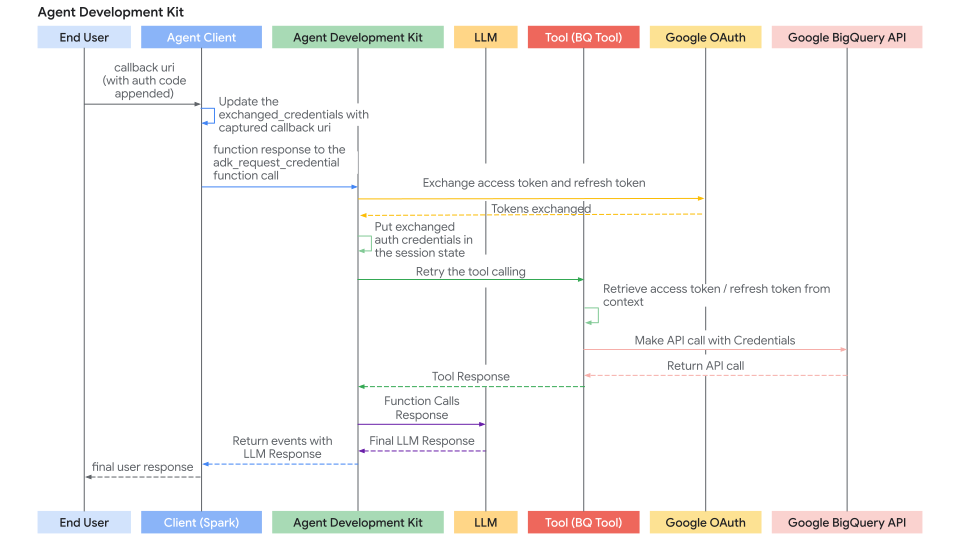
The sequence diagram of auth response flow (where Agent Client send back the auth response and ADK retries tool calling) looks like below:
身份验证响应流程(其中 Agent Client 发回身份验证响应且 ADK 重试工具调用)的时序图如下所示:
Journey 2: Building Custom Tools (FunctionTool) Requiring Authentication
旅程 2: 构建需要身份验证的自定义工具(FunctionTool)
This section focuses on implementing the authentication logic inside your custom Python function when creating a new ADK Tool. We will implement a FunctionTool as an example.
本节重点介绍在创建新的 ADK 工具时在自定义 Python 函数内部实现身份验证逻辑。我们将以 FunctionTool 为例。
Prerequisites
先决条件
Your function signature must include tool_context: ToolContext. ADK automatically injects this object, providing access to state and auth mechanisms.
您的函数签名必须包含 tool_context: ToolContext。ADK 自动注入此对象,提供对状态和身份验证机制的访问。
from google.adk.tools import FunctionTool, ToolContext
from typing import Dict

def my_authenticated_tool_function(param1: str, ..., tool_context: ToolContext) -> dict:
    # ... your logic ...
    pass

my_tool = FunctionTool(func=my_authenticated_tool_function)
Authentication Logic within the Tool Function
工具函数内的身份验证逻辑
Implement the following steps inside your function:
在您的函数中实现以下步骤:
Step 1: Check for Cached & Valid Credentials:
步骤 1: 检查缓存的和有效的凭据:
Inside your tool function, first check if valid credentials (e.g., access/refresh tokens) are already stored from a previous run in this session. Credentials for the current sessions should be stored in tool_context.invocation_context.session.state (a dictionary of state) Check existence of existing credentials by checking tool_context.invocation_context.session.state.get(credential_name, None).
在您的工具函数内部,首先检查是否已在此会话的上一次运行中存储了有效的凭据(例如,访问/刷新令牌)。当前会话的凭据应存储在 tool_context.invocation_context.session.state(状态的字典)中。通过检查 tool_context.invocation_context.session.state.get(credential_name, None) 来检查现有凭据的存在。
from google.oauth2.credentials import Credentials
from google.auth.transport.requests import Request

# Inside your tool function
# 在您的工具函数内部
TOKEN_CACHE_KEY = "my_tool_tokens" # Choose a unique key
# 选择唯一的键
SCOPES = ["scope1", "scope2"] # Define required scopes
# 定义所需的作用域

creds = None
cached_token_info = tool_context.state.get(TOKEN_CACHE_KEY)
if cached_token_info:
    try:
        creds = Credentials.from_authorized_user_info(cached_token_info, SCOPES)
        if not creds.valid and creds.expired and creds.refresh_token:
            creds.refresh(Request())
            tool_context.state[TOKEN_CACHE_KEY] = json.loads(creds.to_json()) # Update cache
            # 更新缓存
        elif not creds.valid:
            creds = None # Invalid, needs re-auth
            # 无效,需要重新验证
            tool_context.state[TOKEN_CACHE_KEY] = None
    except Exception as e:
        print(f"Error loading/refreshing cached creds: {e}")
        creds = None
        tool_context.state[TOKEN_CACHE_KEY] = None

if creds and creds.valid:
    # Skip to Step 5: Make Authenticated API Call
    # 跳到步骤 5: 进行经过身份验证的 API 调用
    pass
else:
    # Proceed to Step 2...
    # 继续步骤 2...
    pass
Step 2: Check for Auth Response from Client
步骤 2: 检查来自客户端的身份验证响应
-
If Step 1 didn't yield valid credentials, check if the client just completed the interactive flow by calling
exchanged_credential = tool_context.get_auth_response().如果步骤 1 没有产生有效的凭据,请检查客户端是否刚刚通过调用
exchanged_credential = tool_context.get_auth_response()完成了交互式流程。 -
This returns the updated
exchanged_credentialobject sent back by the client (containing the callback URL inauth_response_uri).这将返回客户端发回的更新的
exchanged_credential对象(在auth_response_uri中包含回调 URL)。
# Use auth_scheme and auth_credential configured in the tool.
# exchanged_credential: AuthCredential | None
# 使用工具中配置的 auth_scheme 和 auth_credential。
# exchanged_credential: AuthCredential | None

exchanged_credential = tool_context.get_auth_response(AuthConfig(
  auth_scheme=auth_scheme,
  raw_auth_credential=auth_credential,
))
# If exchanged_credential is not None, then there is already an exchanged credetial from the auth response.
# 如果 exchanged_credential 不为 None,则已经从身份验证响应中获得了交换的凭据。
if exchanged_credential:
   # ADK exchanged the access token already for us
   # ADK 已经为我们交换了访问令牌
        access_token = exchanged_credential.oauth2.access_token
        refresh_token = exchanged_credential.oauth2.refresh_token
        creds = Credentials(
            token=access_token,
            refresh_token=refresh_token,
            token_uri=auth_scheme.flows.authorizationCode.tokenUrl,
            client_id=auth_credential.oauth2.client_id,
            client_secret=auth_credential.oauth2.client_secret,
            scopes=list(auth_scheme.flows.authorizationCode.scopes.keys()),
        )
    # Cache the token in session state and call the API, skip to step 5
    # 在会话状态中缓存令牌并调用 API,跳到步骤 5
Step 3: Initiate Authentication Request
步骤 3: 启动身份验证请求
If no valid credentials (Step 1.) and no auth response (Step 2.) are found, the tool needs to start the OAuth flow. Define the AuthScheme and initial AuthCredential and call tool_context.request_credential(). Return a response indicating authorization is needed.
如果没有找到有效的凭据(步骤 1.)和身份验证响应(步骤 2.),工具需要启动 OAuth 流程。定义 AuthScheme 和初始 AuthCredential 并调用 tool_context.request_credential()。返回一个响应,指示需要授权。
# Use auth_scheme and auth_credential configured in the tool.
# 使用工具中配置的 auth_scheme 和 auth_credential。

  tool_context.request_credential(AuthConfig(
    auth_scheme=auth_scheme,
    raw_auth_credential=auth_credential,
  ))
  return {'pending': true, 'message': 'Awaiting user authentication.'}

# By setting request_credential, ADK detects a pending authentication event. It pauses execution and ask end user to login.
# 通过设置 request_credential,ADK 检测到待处理的身份验证事件。它暂停执行并要求最终用户登录。
Step 4: Exchange Authorization Code for Tokens
步骤 4: 交换授权代码以获取令牌
ADK automatically generates oauth authorization URL and presents it to your Agent Client application. your Agent Client application should follow the same way described in Journey 1 to redirect the user to the authorization URL (with redirect_uri appended). Once a user completes the login flow following the authorization URL and ADK extracts the authentication callback url from Agent Client applications, automatically parses the auth code, and generates auth token. At the next Tool call, tool_context.get_auth_response in step 2 will contain a valid credential to use in subsequent API calls.
ADK 自动生成 oauth 授权 URL 并将其呈现给您的 Agent Client 应用程序。您的 Agent Client 应用程序应按照旅程 1 中描述的相同方式将用户重定向到授权 URL(附加 redirect_uri)。一旦用户遵循授权 URL 完成登录流程,ADK 从 Agent Client 应用程序中提取身份验证回调 url,自动解析身份验证代码并生成身份验证令牌。在下一个工具调用中,步骤 2 中的 tool_context.get_auth_response 将包含有效的凭据,可在后续 API 调用中使用。
Step 5: Cache Obtained Credentials
步骤 5: 缓存获取的凭据
After successfully obtaining the token from ADK (Step 2) or if the token is still valid (Step 1), immediately store the new Credentials object in tool_context.state (serialized, e.g., as JSON) using your cache key.
在从 ADK 成功获取令牌(步骤 2)后,或者如果令牌仍然有效(步骤 1),请使用您的缓存键将新的 Credentials 对象立即存储在 tool_context.state 中(序列化,例如作为 JSON)。
# Inside your tool function, after obtaining 'creds' (either refreshed or newly exchanged)
# 在您的工具函数内部,在获取 'creds'(刷新或新交换)后
# Cache the new/refreshed tokens
# 缓存新的/刷新的令牌
tool_context.state[TOKEN_CACHE_KEY] = json.loads(creds.to_json())
print(f"DEBUG: Cached/updated tokens under key: {TOKEN_CACHE_KEY}")
# Proceed to Step 6 (Make API Call)
# 继续步骤 6(进行 API 调用)
Step 6: Make Authenticated API Call
步骤 6: 进行经过身份验证的 API 调用
-
Once you have a valid
Credentialsobject (credsfrom Step 1 or Step 4), use it to make the actual call to the protected API using the appropriate client library (e.g.,googleapiclient,requests). Pass thecredentials=credsargument.一旦您拥有有效的
Credentials对象(来自步骤 1 或步骤 4 的creds),请使用它通过适当的客户端库(例如,googleapiclient、requests)对受保护的 API 进行实际调用。传递credentials=creds参数。 -
Include error handling, especially for
HttpError401/403, which might mean the token expired or was revoked between calls. If you get such an error, consider clearing the cached token (tool_context.state.pop(...)) and potentially returning theauth_requiredstatus again to force re-authentication.包括错误处理,特别是对于
HttpError401/403,这可能意味着令牌在调用之间过期或被撤销。如果遇到此类错误,请考虑清除缓存的令牌(tool_context.state.pop(...))并可能再次返回auth_required状态以强制重新身份验证。
# Inside your tool function, using the valid 'creds' object
# 在您的工具函数内部,使用有效的 'creds' 对象
# Ensure creds is valid before proceeding
# 在继续之前确保 creds 有效
if not creds or not creds.valid:
   return {"status": "error", "error_message": "Cannot proceed without valid credentials."}

try:
   service = build("calendar", "v3", credentials=creds) # Example
   # 示例
   api_result = service.events().list(...).execute()
   # Proceed to Step 7
   # 继续步骤 7
except Exception as e:
   # Handle API errors (e.g., check for 401/403, maybe clear cache and re-request auth)
   # 处理 API 错误(例如,检查 401/403,可能清除缓存并重新请求身份验证)
   print(f"ERROR: API call failed: {e}")
   return {"status": "error", "error_message": f"API call failed: {e}"}
Step 7: Return Tool Result
步骤 7: 返回工具结果
-
After a successful API call, process the result into a dictionary format that is useful for the LLM.
成功的 API 调用后,将结果处理为对 LLM 有用的字典格式。
-
Crucially, include a along with the data.
关键在于,包含一个以及数据。
# Inside your tool function, after successful API call
# 在您的工具函数内部,成功调用 API 后
    processed_result = [...] # Process api_result for the LLM
    # 为 LLM 处理 api_result
    return {"status": "success", "data": processed_result}
Full Code
完整代码
工具和智能体
import os

from google.adk.auth.auth_schemes import OpenIdConnectWithConfig
from google.adk.auth.auth_credential import AuthCredential, AuthCredentialTypes, OAuth2Auth
from google.adk.tools.openapi_tool.openapi_spec_parser.openapi_toolset import OpenAPIToolset
from google.adk.agents.llm_agent import LlmAgent

# --- Authentication Configuration ---
# This section configures how the agent will handle authentication using OpenID Connect (OIDC),
# often layered on top of OAuth 2.0.

# Define the Authentication Scheme using OpenID Connect.
# This object tells the ADK *how* to perform the OIDC/OAuth2 flow.
# It requires details specific to your Identity Provider (IDP), like Google OAuth, Okta, Auth0, etc.
# Note: Replace the example Okta URLs and credentials with your actual IDP details.
# All following fields are required, and available from your IDP.
auth_scheme = OpenIdConnectWithConfig(
    # The URL of the IDP's authorization endpoint where the user is redirected to log in.
    authorization_endpoint="https://your-endpoint.okta.com/oauth2/v1/authorize",
    # The URL of the IDP's token endpoint where the authorization code is exchanged for tokens.
    token_endpoint="https://your-token-endpoint.okta.com/oauth2/v1/token",
    # The scopes (permissions) your application requests from the IDP.
    # 'openid' is standard for OIDC. 'profile' and 'email' request user profile info.
    scopes=['openid', 'profile', "email"]
)

# Define the Authentication Credentials for your specific application.
# This object holds the client identifier and secret that your application uses
# to identify itself to the IDP during the OAuth2 flow.
# !! SECURITY WARNING: Avoid hardcoding secrets in production code. !!
# !! Use environment variables or a secret management system instead. !!
auth_credential = AuthCredential(
  auth_type=AuthCredentialTypes.OPEN_ID_CONNECT,
  oauth2=OAuth2Auth(
    client_id="CLIENT_ID",
    client_secret="CIENT_SECRET",
  )
)


# --- Toolset Configuration from OpenAPI Specification ---
# This section defines a sample set of tools the agent can use, configured with Authentication
# from steps above.
# This sample set of tools use endpoints protected by Okta and requires an OpenID Connect flow
# to acquire end user credentials.
with open(os.path.join(os.path.dirname(__file__), 'spec.yaml'), 'r') as f:
    spec_content = f.read()

userinfo_toolset = OpenAPIToolset(
   spec_str=spec_content,
   spec_str_type='yaml',
   # ** Crucially, associate the authentication scheme and credentials with these tools. **
   # This tells the ADK that the tools require the defined OIDC/OAuth2 flow.
   auth_scheme=auth_scheme,
   auth_credential=auth_credential,
)

# --- Agent Configuration ---
# Configure and create the main LLM Agent.
root_agent = LlmAgent(
    model='gemini-2.0-flash',
    name='enterprise_assistant',
    instruction='Help user integrate with multiple enterprise systems, including retrieving user information which may require authentication.',
    tools=userinfo_toolset.get_tools(),
)

# --- Ready for Use ---
# The `root_agent` is now configured with tools protected by OIDC/OAuth2 authentication.
# When the agent attempts to use one of these tools, the ADK framework will automatically
# trigger the authentication flow defined by `auth_scheme` and `auth_credential`
# if valid credentials are not already available in the session.
# The subsequent interaction flow would guide the user through the login process and handle
# token exchanging, and automatically attach the exchanged token to the endpoint defined in
# the tool.
智能体 CLI
import asyncio
from dotenv import load_dotenv
from google.adk.artifacts.in_memory_artifact_service import InMemoryArtifactService
from google.adk.runners import Runner
from google.adk.sessions import InMemorySessionService
from google.genai import types

from .helpers import is_pending_auth_event, get_function_call_id, get_function_call_auth_config, get_user_input
from .tools_and_agent import root_agent

load_dotenv()

agent = root_agent

async def async_main():
  """
  Main asynchronous function orchestrating the agent interaction and authentication flow.
  """
  # --- Step 1: Service Initialization ---
  # Use in-memory services for session and artifact storage (suitable for demos/testing).
  session_service = InMemorySessionService()
  artifacts_service = InMemoryArtifactService()

  # Create a new user session to maintain conversation state.
  session = session_service.create_session(
      state={},  # Optional state dictionary for session-specific data
      app_name='my_app', # Application identifier
      user_id='user' # User identifier
  )

  # --- Step 2: Initial User Query ---
  # Define the user's initial request.
  query = 'Show me my user info'
  print(f"user: {query}")

  # Format the query into the Content structure expected by the ADK Runner.
  content = types.Content(role='user', parts=[types.Part(text=query)])

  # Initialize the ADK Runner
  runner = Runner(
      app_name='my_app',
      agent=agent,
      artifact_service=artifacts_service,
      session_service=session_service,
  )

  # --- Step 3: Send Query and Handle Potential Auth Request ---
  print("\nRunning agent with initial query...")
  events_async = runner.run_async(
      session_id=session.id, user_id='user', new_message=content
  )

  # Variables to store details if an authentication request occurs.
  auth_request_event_id, auth_config = None, None

  # Iterate through the events generated by the first run.
  async for event in events_async:
    # Check if this event is the specific 'adk_request_credential' function call.
    if is_pending_auth_event(event):
      print("--> Authentication required by agent.")
      auth_request_event_id = get_function_call_id(event)
      auth_config = get_function_call_auth_config(event)
      # Once the auth request is found and processed, exit this loop.
      # We need to pause execution here to get user input for authentication.
      break


  # If no authentication request was detected after processing all events, exit.
  if not auth_request_event_id or not auth_config:
      print("\nAuthentication not required for this query or processing finished.")
      return # Exit the main function

  # --- Step 4: Manual Authentication Step (Simulated OAuth 2.0 Flow) ---
  # This section simulates the user interaction part of an OAuth 2.0 flow.
  # In a real web application, this would involve browser redirects.

  # Define the Redirect URI. This *must* match one of the URIs registered
  # with the OAuth provider for your application. The provider sends the user
  # back here after they approve the request.
  redirect_uri = 'http://localhost:8000/dev-ui' # Example for local development

  # Construct the Authorization URL that the user must visit.
  # This typically includes the provider's authorization endpoint URL,
  # client ID, requested scopes, response type (e.g., 'code'), and the redirect URI.
  # Here, we retrieve the base authorization URI from the AuthConfig provided by ADK
  # and append the redirect_uri.
  # NOTE: A robust implementation would use urlencode and potentially add state, scope, etc.
  auth_request_uri = (
      auth_config.exchanged_auth_credential.oauth2.auth_uri
      + f'&redirect_uri={redirect_uri}' # Simple concatenation; ensure correct query param format
  )

  print("\n--- User Action Required ---")
  # Prompt the user to visit the authorization URL, log in, grant permissions,
  # and then paste the *full* URL they are redirected back to (which contains the auth code).
  auth_response_uri = await get_user_input(
      f'1. Please open this URL in your browser to log in:\n   {auth_request_uri}\n\n'
      f'2. After successful login and authorization, your browser will be redirected.\n'
      f'   Copy the *entire* URL from the browser\'s address bar.\n\n'
      f'3. Paste the copied URL here and press Enter:\n\n> '
  )

  # --- Step 5: Prepare Authentication Response for the Agent ---
  # Update the AuthConfig object with the information gathered from the user.
  # The ADK framework needs the full response URI (containing the code)
  # and the original redirect URI to complete the OAuth token exchange process internally.
  auth_config.exchanged_auth_credential.oauth2.auth_response_uri = auth_response_uri
  auth_config.exchanged_auth_credential.oauth2.redirect_uri = redirect_uri

  # Construct a FunctionResponse Content object to send back to the agent/runner.
  # This response explicitly targets the 'adk_request_credential' function call
  # identified earlier by its ID.
  auth_content = types.Content(
      role='user',
      parts=[
          types.Part(
              function_response=types.FunctionResponse(
                  # Crucially, link this response to the original request using the saved ID.
                  id=auth_request_event_id,
                  # The special name of the function call we are responding to.
                  name='adk_request_credential',
                  # The payload containing all necessary authentication details.
                  response=auth_config.model_dump(),
              )
          )
      ],
  )

  # --- Step 6: Resume Execution with Authentication ---
  print("\nSubmitting authentication details back to the agent...")
  # Run the agent again, this time providing the `auth_content` (FunctionResponse).
  # The ADK Runner intercepts this, processes the 'adk_request_credential' response
  # (performs token exchange, stores credentials), and then allows the agent
  # to retry the original tool call that required authentication, now succeeding with
  # a valid access token embedded.
  events_async = runner.run_async(
      session_id=session.id,
      user_id='user',
      new_message=auth_content, # Provide the prepared auth response
  )

  # Process and print the final events from the agent after authentication is complete.
  # This stream now contain the actual result from the tool (e.g., the user info).
  print("\n--- Agent Response after Authentication ---")
  async for event in events_async:
    print(event)


if __name__ == '__main__':
  asyncio.run(async_main())
辅助程序
from google.adk.auth import AuthConfig
from google.adk.events import Event
import asyncio

# --- Helper Functions ---
async def get_user_input(prompt: str) -> str:
  """
  Asynchronously prompts the user for input in the console.

  Uses asyncio's event loop and run_in_executor to avoid blocking the main
  asynchronous execution thread while waiting for synchronous `input()`.

  Args:
    prompt: The message to display to the user.

  Returns:
    The string entered by the user.
  """
  loop = asyncio.get_event_loop()
  # Run the blocking `input()` function in a separate thread managed by the executor.
  return await loop.run_in_executor(None, input, prompt)


def is_pending_auth_event(event: Event) -> bool:
  """
  Checks if an ADK Event represents a request for user authentication credentials.

  The ADK framework emits a specific function call ('adk_request_credential')
  when a tool requires authentication that hasn't been previously satisfied.

  Args:
    event: The ADK Event object to inspect.

  Returns:
    True if the event is an 'adk_request_credential' function call, False otherwise.
  """
  # Safely checks nested attributes to avoid errors if event structure is incomplete.
  return (
      event.content
      and event.content.parts
      and event.content.parts[0] # Assuming the function call is in the first part
      and event.content.parts[0].function_call
      # The specific function name indicating an auth request from the ADK framework.
      and event.content.parts[0].function_call.name == 'adk_request_credential'
  )


def get_function_call_id(event: Event) -> str:
  """
  Extracts the unique ID of the function call from an ADK Event.

  This ID is crucial for correlating a function *response* back to the specific
  function *call* that the agent initiated to request for auth credentials.

  Args:
    event: The ADK Event object containing the function call.

  Returns:
    The unique identifier string of the function call.

  Raises:
    ValueError: If the function call ID cannot be found in the event structure.
                (Corrected typo from `contents` to `content` below)
  """
  # Navigate through the event structure to find the function call ID.
  if (
      event
      and event.content
      and event.content.parts
      and event.content.parts[0] # Use content, not contents
      and event.content.parts[0].function_call
      and event.content.parts[0].function_call.id
  ):
    return event.content.parts[0].function_call.id
  # If the ID is missing, raise an error indicating an unexpected event format.
  raise ValueError(f'Cannot get function call id from event {event}')


def get_function_call_auth_config(event: Event) -> AuthConfig:
  """
  Extracts the authentication configuration details from an 'adk_request_credential' event.

  Client should use this AuthConfig to necessary authentication details (like OAuth codes and state)
  and sent it back to the ADK to continue OAuth token exchanging.

  Args:
    event: The ADK Event object containing the 'adk_request_credential' call.

  Returns:
    An AuthConfig object populated with details from the function call arguments.

  Raises:
    ValueError: If the 'auth_config' argument cannot be found in the event.
                (Corrected typo from `contents` to `content` below)
  """
  if (
      event
      and event.content
      and event.content.parts
      and event.content.parts[0] # Use content, not contents
      and event.content.parts[0].function_call
      and event.content.parts[0].function_call.args
      and event.content.parts[0].function_call.args.get('auth_config')
  ):
    # Reconstruct the AuthConfig object using the dictionary provided in the arguments.
    # The ** operator unpacks the dictionary into keyword arguments for the constructor.
    return AuthConfig(
          **event.content.parts[0].function_call.args.get('auth_config')
      )
  raise ValueError(f'Cannot get auth config from event {event}')
规范
openapi: 3.0.1
info:
title: Okta User Info API
version: 1.0.0
description: |-
   API to retrieve user profile information based on a valid Okta OIDC Access Token.
   Authentication is handled via OpenID Connect with Okta.
contact:
   name: API Support
   email: support@example.com # Replace with actual contact if available
servers:
- url: <substitute with your server name>
   description: Production Environment
paths:
/okta-jwt-user-api:
   get:
      summary: Get Authenticated User Info
      description: |-
      Fetches profile details for the user
      operationId: getUserInfo
      tags:
      - User Profile
      security:
      - okta_oidc:
            - openid
            - email
            - profile
      responses:
      '200':
         description: Successfully retrieved user information.
         content:
            application/json:
            schema:
               type: object
               properties:
                  sub:
                  type: string
                  description: Subject identifier for the user.
                  example: "abcdefg"
                  name:
                  type: string
                  description: Full name of the user.
                  example: "Example LastName"
                  locale:
                  type: string
                  description: User's locale, e.g., en-US or en_US.
                  example: "en_US"
                  email:
                  type: string
                  format: email
                  description: User's primary email address.
                  example: "username@example.com"
                  preferred_username:
                  type: string
                  description: Preferred username of the user (often the email).
                  example: "username@example.com"
                  given_name:
                  type: string
                  description: Given name (first name) of the user.
                  example: "Example"
                  family_name:
                  type: string
                  description: Family name (last name) of the user.
                  example: "LastName"
                  zoneinfo:
                  type: string
                  description: User's timezone, e.g., America/Los_Angeles.
                  example: "America/Los_Angeles"
                  updated_at:
                  type: integer
                  format: int64 # Using int64 for Unix timestamp
                  description: Timestamp when the user's profile was last updated (Unix epoch time).
                  example: 1743617719
                  email_verified:
                  type: boolean
                  description: Indicates if the user's email address has been verified.
                  example: true
               required:
                  - sub
                  - name
                  - locale
                  - email
                  - preferred_username
                  - given_name
                  - family_name
                  - zoneinfo
                  - updated_at
                  - email_verified
      '401':
         description: Unauthorized. The provided Bearer token is missing, invalid, or expired.
         content:
            application/json:
            schema:
               $ref: '#/components/schemas/Error'
      '403':
         description: Forbidden. The provided token does not have the required scopes or permissions to access this resource.
         content:
            application/json:
            schema:
               $ref: '#/components/schemas/Error'
components:
securitySchemes:
   okta_oidc:
      type: openIdConnect
      description: Authentication via Okta using OpenID Connect. Requires a Bearer Access Token.
      openIdConnectUrl: https://your-endpoint.okta.com/.well-known/openid-configuration
schemas:
   Error:
      type: object
      properties:
      code:
         type: string
         description: An error code.
      message:
         type: string
         description: A human-readable error message.
      required:
         - code
         - message