MCP Toolbox for Databases
数据库 MCP 工具箱
MCP Toolbox for Databases is an open source MCP server for databases. It was designed with enterprise-grade and production-quality in mind. It enables you to develop tools easier, faster, and more securely by handling the complexities such as connection pooling, authentication, and more.
数据库 MCP 工具箱是一个用于数据库的开源 MCP 服务器。它的设计考虑了企业级和生产质量。它通过处理连接池、身份验证等复杂性,使你能够更轻松、更快、更安全地开发工具。
Google's Agent Development Kit (ADK) has built in support for Toolbox. For more information on getting started or configuring Toolbox, see the documentation.
Google 的智能体开发工具包(ADK)内置了对工具箱的支持。有关入门或配置工具箱的更多信息,请参阅文档。
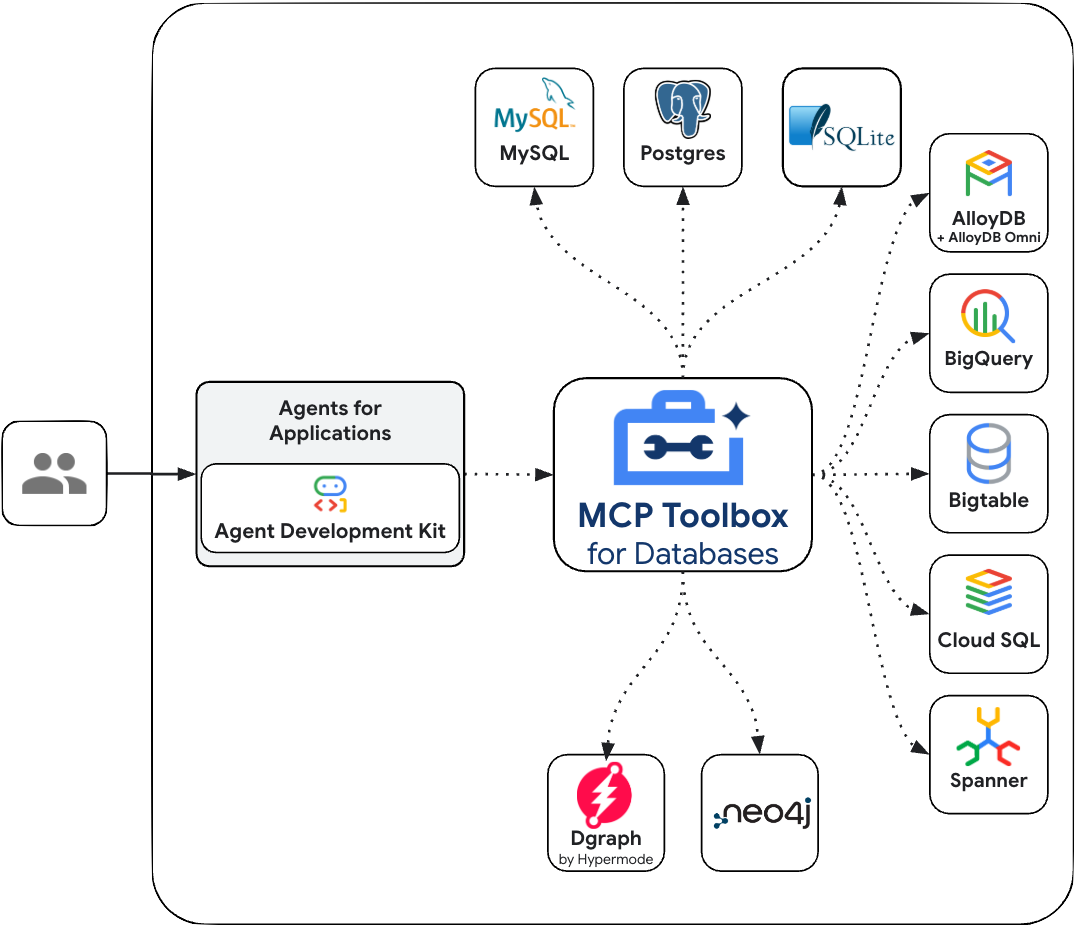
Supported Data Sources
支持的数据源
MCP Toolbox provides out-of-the-box toolsets for the following databases and data platforms: MCP 工具箱为以下数据库和数据平台提供开箱即用的工具集:
Google Cloud
- BigQuery (including tools for SQL execution, schema discovery, and AI-powered time series forecasting) (包括 SQL 执行、架构发现和 AI 驱动的时间序列预测工具)
- AlloyDB (PostgreSQL-compatible, with tools for both standard queries and natural language queries) (PostgreSQL 兼容,具有标准查询和自然语言查询的工具)
- AlloyDB Admin
- Spanner (supporting both GoogleSQL and PostgreSQL dialects) (支持 GoogleSQL 和 PostgreSQL 方言)
- Cloud SQL (with dedicated support for Cloud SQL for PostgreSQL, Cloud SQL for MySQL, and Cloud SQL for SQL Server) (专门支持 [Cloud SQL for PostgreSQL]、[Cloud SQL for MySQL] 和 [Cloud SQL for SQL Server])
- Cloud SQL Admin
- Firestore
- Bigtable
- Dataplex (for data discovery and metadata search) (用于数据发现和元数据搜索)
- Cloud Monitoring
Relational & SQL Databases
关系型和 SQL 数据库
- PostgreSQL (generic) (通用)
- MySQL (generic) (通用)
- Microsoft SQL Server (generic) (通用)
- ClickHouse
- TiDB
- OceanBase
- Firebird
- SQLite
- YugabyteDB
NoSQL & Key-Value Stores
NoSQL 和键值存储
Graph Databases
图数据库
Data Platforms & Federation
数据平台和联合
- Looker (for running Looks, queries, and building dashboards via the Looker API) (用于通过 Looker API 运行 Looks、查询和构建仪表板)
- Trino (for running federated queries across multiple sources) (用于在多个源之间运行联合查询)
Other
其他
Configure and deploy
配置和部署
Toolbox is an open source server that you deploy and manage yourself. For more instructions on deploying and configuring, see the official Toolbox documentation:
工具箱是一个开源服务器,由你自己部署和管理。有关部署和配置的更多说明,请参阅官方工具箱文档:
Install Client SDK for ADK
安装 ADK 客户端 SDK
ADK relies on the toolbox-core python package to use Toolbox. Install the
package before getting started:
ADK 依赖 toolbox-core python 包来使用工具箱。在开始之前安装该包:
Loading Toolbox Tools
加载工具箱工具
Once you're Toolbox server is configured and up and running, you can load tools from your server using ADK:
一旦你的工具箱服务器配置完成并运行,你可以使用 ADK 从你的服务器加载工具:
from google.adk.agents import Agent
from toolbox_core import ToolboxSyncClient

toolbox = ToolboxSyncClient("https://127.0.0.1:5000")

# Load a specific set of tools
# 加载特定的工具集
tools = toolbox.load_toolset('my-toolset-name'),
# Load single tool
# 加载单个工具
tools = toolbox.load_tool('my-tool-name'),

root_agent = Agent(
    ...,
    tools=tools # Provide the list of tools to the Agent
               # 向智能体提供工具列表

)
ADK relies on the @toolbox-sdk/adk TS package to use Toolbox. Install the
package before getting started:
ADK 依赖 @toolbox-sdk/adk TS 包来使用工具箱。在开始之前安装该包:
Loading Toolbox Tools
加载工具箱工具
Once you're Toolbox server is configured and up and running, you can load tools from your server using ADK:
一旦你的工具箱服务器配置完成并运行,你可以使用 ADK 从你的服务器加载工具:
import {InMemoryRunner, LlmAgent} from '@google/adk';
import {Content} from '@google/genai';
import {ToolboxClient} from '@toolbox-sdk/adk'

const toolboxClient = new ToolboxClient("http://127.0.0.1:5000");
const loadedTools = await toolboxClient.loadToolset();

export const rootAgent = new LlmAgent({
  name: 'weather_time_agent',
  model: 'gemini-2.5-flash',
  description:
    'Agent to answer questions about the time and weather in a city.',
  instruction:
    'You are a helpful agent who can answer user questions about the time and weather in a city.',
  tools: loadedTools,
});

async function main() {
  const userId = 'test_user';
  const appName = rootAgent.name;
  const runner = new InMemoryRunner({agent: rootAgent, appName});
  const session = await runner.sessionService.createSession({
    appName,
    userId,
  });

  const prompt = 'What is the weather in New York? And the time?';
  const content: Content = {
    role: 'user',
    parts: [{text: prompt}],
  };
  console.log(content);
  for await (const e of runner.runAsync({
    userId,
    sessionId: session.id,
    newMessage: content,
  })) {
    if (e.content?.parts?.[0]?.text) {
      console.log(`${e.author}: ${JSON.stringify(e.content, null, 2)}`);
    }
  }
}

main().catch(console.error);
ADK relies on the mcp-toolbox-sdk-go go module to use Toolbox. Install the
module before getting started:
ADK 依赖 mcp-toolbox-sdk-go go 模块来使用工具箱。在开始之前安装该模块:
Loading Toolbox Tools
加载工具箱工具
Once you're Toolbox server is configured and up and running, you can load tools from your server using ADK:
一旦你的工具箱服务器配置完成并运行,你可以使用 ADK 从你的服务器加载工具:
package main

import (
    "context"
    "fmt"

    "github.com/googleapis/mcp-toolbox-sdk-go/tbadk"
    "google.golang.org/adk/agent/llmagent"
)

func main() {

  toolboxClient, err := tbadk.NewToolboxClient("https://127.0.0.1:5000")
    if err != nil {
        log.Fatalf("Failed to create MCP Toolbox client: %v", err)
    }

  // Load a specific set of tools
  // 加载特定的工具集
  toolboxtools, err := toolboxClient.LoadToolset("my-toolset-name", ctx)
  if err != nil {
    return fmt.Sprintln("Could not load Toolbox Toolset", err)
  }

  toolsList := make([]tool.Tool, len(toolboxtools))
    for i := range toolboxtools {
      toolsList[i] = &toolboxtools[i]
    }

  llmagent, err := llmagent.New(llmagent.Config{
    ...,
    Tools:       toolsList,
  })

  // Load a single tool
  // 加载单个工具
  tool, err := client.LoadTool("my-tool-name", ctx)
  if err != nil {
    return fmt.Sprintln("Could not load Toolbox Tool", err)
  }

  llmagent, err := llmagent.New(llmagent.Config{
    ...,
    Tools:       []tool.Tool{&toolboxtool},
  })
}
Advanced Toolbox Features
高级工具箱功能
Toolbox has a variety of features to make developing Gen AI tools for databases. For more information, read more about the following features:
工具箱具有多种功能,可简化为数据库开发 Gen AI 工具的工作。有关更多信息,请阅读以下功能:
- Authenticated Parameters: bind tool inputs to values from OIDC tokens automatically, making it easy to run sensitive queries without potentially leaking data 经过身份验证的参数: 自动将工具输入绑定到来自 OIDC 令牌的值,便于运行敏感查询而不会潜在泄露数据
- Authorized Invocations: restrict access to use a tool based on the users Auth token 授权调用: 根据用户的身份验证令牌限制使用工具的访问
- OpenTelemetry: get metrics and tracing from Toolbox with OpenTelemetry OpenTelemetry: 使用 OpenTelemetry 从工具箱获取指标和跟踪