第9章
构建你的 PM 技能库
你已经搭建了一个行之有效的反馈合成工作流。你运行了三次。每次你都要启动一个Claude Code会话,解释你想要什么("分析这份CSV反馈数据,按主题分类,统计频率,提取引用"),等待Claude搞清楚你的流程,检查输出,通过后续提示进行优化。结果不错。但低效是显而易见的:你每次都在重新教同样的工作流。
技能(Skills)解决了这个问题。一个技能就是一个文件夹,包含一个SKILL.md文件,当你的请求与技能的功能匹配时,Claude Code会自动加载其中的指令。你只需定义一次工作流(输入、处理流程、输出格式、质量标准),之后就只需描述你想做什么。如果描述匹配了某个技能,Claude Code就会加载那些指令,直接执行工作流,无需重复解释。
第一次做反馈合成,包括设置和迭代,需要45分钟。第二次合成,使用从第一次运行中构建的技能来做,只需10分钟。第三次,10分钟。第四次,10分钟。你已经把过程编码化了。每次重复都在累积节省的时间。
本章提供五个入门技能,覆盖常见的PM工作流,向你展示如何从零开始构建第一个自定义技能,并解释如何随时间推移维护和演进你的技能库。到本章结束时,你将拥有可重复、一致的工作流,用于你每月或每季度执行的任务(反馈合成、发布说明、竞品分析),每次执行方式一致,无需认知负担。
9.1 入门工具包:五个必备PM技能
这五个技能覆盖了大多数PM经常重复执行的工作流。你可以按照展示的模式自行构建,也可以根据具体需求进行调整。每个技能构建好后,每次调用可节省20-40分钟。
9.1.1 技能1:反馈合成器
目的:将非结构化的客户反馈(支持工单、NPS回复、调查数据)转化为按主题分类的报告,包含频率统计和支持性引用。
使用场景:
- 季度反馈回顾用于路线图规划
- 发布后反馈分析
- 功能请求优先级排序
- 面向干系人的客户洞察合成
运作方式:你提供包含反馈的CSV或文本文件。该技能应用一致的分类方法,识别重复出现的主题,统计频率,评估情感倾向,并生成一份包含支持性证据的结构化报告。
SKILL.md结构:
---name: feedback-synthesizerdescription: Synthesizes customer feedback from CSV or text files into themed reports with frequency analysis and supporting quotes. Auto-invoke when user mentions feedback analysis, customer insights, NPS synthesis, or support ticket themes.---# Feedback Synthesizer Skill## PurposeAnalyze unstructured customer feedback and produce structured theme reports for roadmap planning and insight synthesis.## Expected Inputs- CSV files with feedback text in a column (support tickets, NPS responses, survey data)- Plain text files with feedback items separated by blank lines- Multiple feedback sources to synthesize together## Process1. Read all feedback files provided2. Identify recurring themes (10-15 distinct themes typically)3. Count frequency of each theme4. Assess sentiment per theme (positive/negative/neutral/mixed distribution)5. Extract representative quotes (3-5 per theme)6. Prioritize themes by frequency and severity language## Output FormatGenerate a markdown report: feedback/theme-report-[date].mdStructure:- Executive Summary: Top 3 themes by frequency, top 3 by severity- Detailed Themes: One section per theme with: - Theme name and description - Frequency count and percentage - Sentiment distribution - Representative quotes - Suggested action or investigation area- Cross-Cutting Patterns: Themes that frequently co-occur- Weak Signals: Low-frequency themes worth monitoring## Quality Criteria- Themes must appear in at least 5 feedback items unless flagged as critical- Quotes must be actual verbatim excerpts, not paraphrased- Frequency counts must be accurate- Sentiment assessment based on language used, not assumed- Report length under 6 pages for readability## Common Pitfalls- Don't create too many themes. Consolidate similar concepts- Don't bias toward recent feedback. Analyze all data equally- Don't infer sentiment without textual evidence
可自定义项:
- 主题最小频率阈值(默认:出现5次)
- 预定义类别vs.涌现式主题
- 情感分析深度
- 报告长度与格式
调用方式:只需描述你的需求:"分析 data/q1-2026-feedback.csv 中的反馈,生成主题报告。"Claude Code看到技能描述与你请求匹配,就会自动加载feedback-synthesizer技能。
9.1.2 技能2:竞品情报扫描器
目的:生成结构化的竞品分析,从功能、定位、定价等方面比较你的产品与竞争对手。
使用场景:
- 季度竞品格局更新
- 功能差距分析
- 定价策略审查
- 市场定位研究
运作方式:你提供竞品名称和需要比较的维度(功能、定价、定位)。该技能研究每个竞品,将发现整理成对比矩阵,并生成版本管理的竞品情报文档。
SKILL.md结构:
---name: competitive-inteldescription: Generates structured competitive analysis comparing products across features, pricing, and positioning. Auto-invoke when user mentions competitive analysis, competitor comparison, market landscape, or feature gap analysis.---# Competitive Intelligence Scanner Skill## PurposeCreate systematic competitive analysis reports for roadmap planning and strategic positioning.## Expected Inputs- List of competitor names or URLs- Comparison dimensions (features, pricing, positioning, target market)- Existing competitive docs to update (optional)## Process1. For each competitor, gather information about: - Core features and capabilities - Pricing model and tiers - Target market and positioning - Strengths and weaknesses relative to our product2. Create comparison matrices across competitors3. Identify feature gaps (what they have that we lack)4. Identify differentiation opportunities (what we have that they lack)5. Summarize strategic implications## Output FormatGenerate markdown files in research/competitors/:- competitor-[name]-profile.md for each competitor (detailed profile)- competitive-matrix-[date].md (comparison table)- competitive-summary-[date].md (strategic analysis)Comparison matrix format:- Rows: Feature categories or evaluation criteria- Columns: Competitors plus your product- Cells: ✓ (has feature), ✗ (lacks feature), ~ (partial/limited), or description## Quality Criteria- Information must be current (check dates of sources)- Pricing must include all tiers, not just base price- Feature comparisons must be apples-to-apples (same capabilities, not just names)- Avoid bias. Represent competitor strengths accurately- Include sources for verification## Update FrequencyRun quarterly or when:- Major competitor launches announced- Pricing changes occur- Strategic positioning shifts needed
可自定义项:
- 比较标准(功能、定价、目标市场、UX、集成)
- 跟踪的竞品数量
- 更新频率
- 输出格式(矩阵vs.叙述)
调用方式:"更新竞品A、竞品B和竞品C的竞品分析,重点关注定价和企业功能。"
9.1.3 技能3:发布说明生成器
目的:根据git提交历史和Jira工单生成面向客户的发布说明,使用产品化的语言风格。
使用场景:
- 月度或季度发布公告
- 功能上线通知
- 更新日志维护
- 客户更新邮件
运作方式:你指定版本标签或日期范围。该技能读取git提交记录,筛选面向用户的变更,按类型分类(新增/改进/修复/移除),并以你的产品风格撰写发布说明。
SKILL.md结构:
---name: release-notesdescription: Generates customer-facing release notes from git history and Jira tickets, written in product voice. Auto-invoke when user mentions release notes, changelog, version notes, or feature announcements.---# Release Notes Generator Skill## PurposeCreate consistent, customer-friendly release notes for product updates and feature launches.## Expected Inputs- Version number or tag (e.g., "v2.5.0" or git tag)- Date range (e.g., "commits since last release" or "January 1-31, 2026")- Optional Jira filter or ticket list for additional context## Process1. Read git commits in the specified range2. Identify user-facing changes (filter out internal refactoring, dependency updates)3. Categorize changes: - Added: New features or capabilities - Changed: Improvements to existing features - Fixed: Bug fixes - Removed: Deprecated or removed features4. Write descriptions in product language (not technical jargon)5. Group related changes together6. Order by user impact (most impactful first)## Output FormatGenerate CHANGELOG.md entry or docs/releases/[version].md:``## [Version X.Y.Z] - YYYY-MM-DD### Added- [Feature description in user terms]### Changed- [Improvement description]### Fixed- [Bug fix in plain language]### Removed- [Deprecated feature with migration guidance if needed]``## Voice and Tone- Customer-facing, not technical: "Bulk user import now supports up to 1,000 users" not "Increased MAX_IMPORT_SIZE constant"- Benefit-oriented: Explain what users can now do, not just what changed- Clear and concise: One sentence per change typically- Active voice: "Added dashboard customization" not "Dashboard customization has been added"## Quality Criteria- Only include changes that affect user experience- Each change must be understandable without reading commit messages- Related changes should be grouped, not listed separately- Removed features should note alternatives or migration paths- Version number and date must be accurate## Common Patterns- Internal refactoring → exclude unless it affects performance- Dependency updates → exclude unless they add user-facing capability- Bug fixes in unreleased features → exclude (not relevant to customers)- Breaking changes → call out explicitly with migration guidance
可自定义项:
- 语言风格(正式vs.随意,技术深度)
- 分类方案(增加"弃用"、"安全"等)
- 输出格式(更新日志、邮件、应用内公告)
- 是否包含破坏性变更部分
- 内部版本vs.面向客户版本
调用方式:"根据v2.4.0以来的提交生成v2.5.0的发布说明。"
9.1.4 技能4:PRD审计器
目的:根据完整性检查清单审查PRD文档,识别差距或不一致。
使用场景:
- Kickoff前的PRD审查
- 干系人准备度检查
- 工程交接准备
- 季度PRD质量审计
运作方式:你将技能指向一个PRD文件。它检查必填部分,评估完整性,标记模糊之处,提出改进建议,并生成一份带评分的审计报告。
SKILL.md结构:
---name: prd-auditordescription: Reviews PRD documents for completeness, clarity, and consistency. Auto-invoke when user mentions PRD review, requirements audit, PRD checklist, or spec validation.---# PRD Auditor Skill## PurposeSystematically review PRD documents to ensure completeness before engineering kickoff.## Expected Inputs- Path to PRD markdown file (e.g., docs/prds/feature-name.md)- Optional custom checklist or scoring rubric## Process1. Read the PRD document2. Check for required sections: - Overview and success metrics - User personas and use cases - Functional and non-functional requirements - User experience / workflows - Technical approach - Out of scope - Open questions - Success criteria3. Evaluate each section for: - Completeness: Are critical details present? - Clarity: Is it unambiguous? - Specificity: Are requirements testable/measurable? - Consistency: Do sections align (e.g., success metrics match requirements)?4. Flag issues: - Missing sections - Vague or ambiguous requirements - Unresolved open questions marked as "TBD" - Success metrics that aren't measurable - Technical approach missing implementation details5. Score overall PRD readiness (Ready / Needs Work / Incomplete)## Output FormatGenerate audit report as comment in the PRD or separate file:``markdown# PRD Audit: [Feature Name]Audit Date: YYYY-MM-DDOverall Score: Ready / Needs Work / Incomplete## Completeness Check- [✓] Overview and success metrics- [✗] User personas (missing or too generic)- [✓] Functional requirements- [~] Non-functional requirements (performance criteria vague)...## Issues Found### Critical (Must fix before kickoff)1. Success metrics not measurable: "Users will be happier" → Define specific metric2. Open questions section has 3 unresolved items marked "TBD" → Resolve or document assumptions### Important (Should fix)1. Technical approach missing specific files/modules that need changes2. Out of scope section too brief. This could cause scope creep### Minor (Nice to fix)1. No timeline/milestones section2. Appendix missing links to related docs## Recommendations- Consult Engineering for technical approach details- Define measurable success metrics (usage %, time saved, error rate reduction)- Resolve open questions or document assumptions explicitly`## Scoring MethodologyReady: All required sections present and complete, fewer than 2 critical issuesNeeds Work: Required sections present but critical gaps exist (3-5 critical issues)Incomplete: Missing required sections or 6+ critical issues## Checklist CustomizationThe default checklist can be overridden by including a PRD_CHECKLIST.md` file in the same directory defining custom requirements.
可自定义项:
- 必填部分(根据你团队的PRD模板调整)
- 评分标准和阈值
- 问题严重程度定义
- 具体质量检查(例如,所有需求必须有验收标准)
调用方式:"审计 docs/prds/bulk-import.md 的PRD,告诉我缺失了什么。"
9.1.5 技能5:用户故事扩展器
目的:将功能概念扩展为详细的用户故事,包含验收标准和边界情况,结合代码库上下文。
使用场景:
- Sprint规划准备
- Epic拆解
- 功能范围界定
- 工程交接
运作方式:你提供功能描述和目标用户画像。该技能探索代码库获取技术上下文(现有模式、约束条件),按照你团队的格式生成全面的用户故事,包含验收标准,并根据代码库模式识别边界情况。
SKILL.md结构:
---name: user-story-expanderdescription: Expands feature concepts into detailed user stories with acceptance criteria, technical notes, and edge cases. Auto-invoke when user mentions user stories, story expansion, acceptance criteria, or epic breakdown.---# User Story Expander Skill## PurposeGenerate comprehensive user stories for features, grounded in codebase context and technical constraints.## Expected Inputs- Feature description (2-3 sentences about what to build)- Target persona or user type- Core workflows the feature must support- Optional: existing user story file to append to## Process1. Explore codebase for technical context: - Existing patterns related to this feature area - Validation rules and constraints - Similar features to reference - Potential integration points2. Generate 5-8 user stories covering: - Core happy path workflow - Variations (different user types, scenarios) - Error handling and edge cases - Admin/configuration needs if applicable3. For each story, include: - User story statement (As a X, I want to Y, so that Z) - Acceptance criteria (specific, testable) - Technical notes (files/modules affected, patterns to follow) - Edge cases (boundary conditions, error states)4. Prioritize stories by user value## Output FormatGenerate or append to docs/user-stories/[feature-name].md:``markdown# User Stories: [Feature Name]## Story 1: [Primary Workflow]As a [persona],I want to [action],So that [benefit].Acceptance Criteria:- [Specific, testable criterion]- [Another criterion]- [Edge case handling]Technical Notes:- Relevant files: src/path/to/file.js:123- Pattern to follow: See src/services/batch-operations.js for async processing- Constraints: File upload limit 10MB, user creation validation rules in user-service.jsEdge Cases:- What if file exceeds size limit?- What if user already exists?- What if validation fails mid-process?## Story 2: [Variation or Secondary Workflow]...``## Quality Criteria- Stories must be user-centric (not implementation-focused)- Acceptance criteria must be testable (not vague)- Technical notes must reference actual files in codebase- Edge cases must be realistic based on codebase constraints- Coverage: 80% of typical scenarios (not every possible edge case)## Story FormatUse standard "As a / I want to / So that" format unless team has custom template.
可自定义项:
- 故事格式(如果你的团队使用不同的模板)
- 生成的故事数量(默认5-8个)
- 技术细节深度
- 是否包含故事点估算
- 与Jira/Linear集成(引用工单格式)
调用方式:"将批量用户导入功能扩展为面向企业管理员画像的用户故事。"
这五个技能构成了你的入门工具包。一次性构建好,根据你的具体场景进行自定义,然后在工作流重复出现时调用它们。每个技能将30-60分钟的手动任务缩减为10分钟的自动化执行,且输出质量一致。
9.2 逐步创建你的第一个技能
你要通过动手构建来学习,而不仅仅是阅读模板。本节将逐步演示从零开始创建一个反馈合成器技能的过程,这是最常见的PM工作流,也是你可以适配到其他技能的模式。
选择一个可重复编码的工作流。选择一个你至少做过两次并且还会再做的工作流:反馈合成、竞品分析、发布说明、PRD生成。选择任何具有一致的输入、处理流程和输出的工作。
不适合作为第一个技能的选择:不会再重复的一次性分析。尚未验证的实验性工作流。每次都有显著变化的流程。
好的选择:季度反馈回顾。月度发布说明。遵循相同模式的功能调研。任何你发现自己反复以同样方式向Claude Code解释的事情。
我们将构建一个反馈合成器,因为它展示了核心模式:结构化输入、一致性处理、格式化输出。
起草初始SKILL.md。创建目录结构:
mkdir -p .claude/skills/feedback-synthesizercd .claude/skills/feedback-synthesizer
创建SKILL.md:
touch SKILL.md
在编辑器中打开它。从YAML前置信息开始。这一点至关重要:name和description决定了Claude Code是否会加载你的技能。
---name: feedback-synthesizerdescription: Synthesizes customer feedback from CSV or text files into themed reports with frequency analysis and supporting quotes. Auto-invoke when user mentions feedback analysis, customer insights, NPS synthesis, or support ticket themes.---
关键点:description是你技能的接口。Claude Code读取它来决定是否加载该技能。要具体说明: - 技能做什么("Synthesizes customer feedback") - 它处理什么输入格式("CSV or text files") - 它产出什么输出("themed reports with frequency analysis") - 何时调用("feedback analysis, customer insights, NPS synthesis")
模糊的描述 = 技能在需要时不会激活。过于具体的描述 = 技能只在精确措辞时激活。在具体性和合理的模式匹配之间取得平衡。
现在在前置信息下方编写技能指令:
Feedback Synthesizer Skill## PurposeAnalyze unstructured customer feedback and produce structured theme reports for roadmap planning.## Expected Inputs- CSV files with feedback text column- Plain text files with feedback items separated by blank lines- Supports multiple files to synthesize together## ProcessFollow these steps exactly:1. Read all feedback data - Identify which column contains feedback text in CSV files - Count total feedback items2. Identify themes - Read all feedback completely before categorizing - Identify 10-15 distinct recurring themes - Theme must appear in at least 5 feedback items to be included - Consolidate similar themes (don't over-segment)3. Categorize and count - Assign each feedback item to one or more themes - Count frequency per theme - Calculate percentage of total feedback4. Assess sentiment - For each theme, determine sentiment based on language used - Categories: Positive, Negative, Neutral, Mixed - Base on actual words used, not assumptions5. Extract supporting quotes - Select 3-5 representative quotes per theme - Use verbatim text, not paraphrased - Choose quotes that clearly illustrate the theme6. Prioritize - Rank themes by frequency - Flag high-severity themes (language like "blocking", "critical", "frustrated")## Output FormatGenerate markdown report: feedback/theme-report-[YYYY-MM-DD].mdStructure:``markdown# Feedback Synthesis Report - [Date]## Executive SummaryTop 3 themes by frequency:1. [Theme name] - [count] mentions ([percentage]%)2. [Theme name] - [count] mentions ([percentage]%)3. [Theme name] - [count] mentions ([percentage]%)Top 3 themes by severity:1. [Theme name] - [severity assessment]2. [Theme name] - [severity assessment]3. [Theme name] - [severity assessment]## Detailed Themes### Theme: [Name]Description: [What this theme represents - 1 sentence]Frequency: [count] mentions ([percentage]% of total feedback)Sentiment: [Distribution - e.g., "75% negative, 20% neutral, 5% positive"]Severity: [High/Medium/Low based on language used]Representative Quotes:- "[Verbatim quote 1]"- "[Verbatim quote 2]"- "[Verbatim quote 3]"Suggested Action: [What to investigate or consider][Repeat for each theme]## Cross-Cutting Patterns[Themes that frequently appear together - e.g., "Slow performance and Export failures often mentioned together"]## Weak Signals[Low-frequency themes worth monitoring but not urgent]``## Quality Criteria- Themes based on actual patterns in data, not assumptions- Quotes are verbatim excerpts, not summarized- Frequency counts are accurate- Sentiment based on language evidence- Report is scannable (under 6 pages)- Themes are distinct, not overlapping
创建参考文件。有些技能受益于参考文件:模板、评分标准、示例。对于反馈合成,你可以包含:
touch theme-categories.md
在theme-categories.md中,如果你更喜欢预定义主题而非涌现式主题,定义你的默认类别:
Feedback Theme CategoriesUse these categories when analyzing feedback, unless emergent themes are more appropriate:- Feature Requests- Performance Issues- Usability Problems- Bug Reports- Integration Requests- Documentation Gaps- Pricing/Billing Concerns- Support ExperienceIf feedback doesn't fit these categories, create new themes as needed.
如果你希望一致的分类方式,在SKILL.md中引用它:
Categorization ApproachUse predefined categories from theme-categories.md if feedback clearly fits.Create emergent themes when feedback patterns don't match predefined categories.
用真实输入进行测试。不要提交未经测试的技能。用实际数据运行它:
cd /path/to/your/projectclaude
准备测试反馈数据(使用过去一个季度的真实数据):
Assuming you have feedback CSV in data/test-feedback.csv
Analyze the feedback in data/test-feedback.csv and generate a theme report.
观察发生了什么。Claude Code应该识别到技能描述匹配("feedback analysis")并提示你:
I found a skill that might help: feedback-synthesizerLoad this skill? (y/n)
确认。Claude加载你的SKILL.md指令并执行工作流。
检查输出: - 它是否遵循了你的处理步骤? - 输出格式是否正确? - 主题是否合理且有充分支撑? - 频率统计是否准确? - 引用是否为原文?
根据输出质量进行迭代。你的第一个技能不会完美。常见问题:
问题:主题过于细碎(20+个主题,许多只有1-2次提及) 修复:在SKILL.md中添加:"Consolidate themes with <5 mentions unless critically severe. Aim for 10-15 distinct themes maximum."
问题:引用是改述或摘要而非原文 修复:在SKILL.md中强调:"Quotes MUST be verbatim excerpts from feedback, enclosed in quotation marks, not summaries."
问题:情感评估似乎是基于假设而非文本依据 修复:添加:"Sentiment must be based on specific language used in feedback. If language is neutral/factual, sentiment is neutral regardless of topic negativity."
问题:报告长达12页(太长) 修复:添加:"Limit to top 10 themes. Combine related themes if report exceeds 6 pages."
编辑你的SKILL.md,然后用同样的数据重新测试。比较输出。迭代直到你得到一致、高质量的结果。
记录边界情况。在SKILL.md中添加一节,捕获失败模式:
Edge Cases and LimitationsVery small dataset (<50 feedback items):- May not find meaningful themes- Recommend manual review insteadHighly heterogeneous feedback (every item unique):- Themes won't emerge- Suggest segmenting by customer type or use case firstLow-quality feedback (one-word responses, "good/bad" only):- Insufficient data to categorize meaningfully- Note this in report and recommend improving data collectionMultiple languages in dataset:- May categorize differently across languages- Recommend separating languages if theme consistency neededExtremely large dataset (>2,000 items):- Processing may take longer and consume significant tokens- Consider sampling or batching by time period
最终化并提交。你的技能持续正常运转。是时候将其纳入版本管理:
git add .claude/skills/feedback-synthesizer/git commit -m "Add feedback-synthesizer skill for quarterly feedback analysis"
现在,团队中使用这个仓库的任何人都可以访问该技能。未来的你也会受益。你的流程已被编码。
第一个技能的时间投入。起草初始SKILL.md:20-30分钟。用真实数据测试:15-20分钟。迭代和优化:20-40分钟(取决于发现的问题数量)。记录边界情况:10分钟。总计:65-100分钟。
这看起来工作量大。对比一下,如果每个季度都重复手动流程:每次合成45分钟 × 4个季度 = 每年180分钟。你的技能在第二次使用时就回本了,此后每次使用都在节省时间。
9.3 长期保持技能有效运转
技能不是一次写入即可的产物。你的流程会演进。你的数据格式会变化。你会发现边界情况。良好的技能维护能保持你的库有价值。
何时更新vs.创建新技能。更新现有技能的情况: - 流程保持不变但需要优化(更好的输出格式、更清晰的指令) - 你发现了需要记录的边界情况 - 输入格式稍微演变(CSV新增了列) - 输出格式需要增强(给报告增加新部分)
创建新技能的情况: - 流程根本不同(不同的分析方法论) - 输入类型不同(反馈合成vs.访谈合成) - 输出用于不同目的(内部分析vs.外部报告) - 工作流即使领域相似但不相关
示例:你有feedback-synthesizer用于分类反馈。你想要根据主题报告创建执行摘要。这是一个不同的工作流,输入不同(主题报告,而非原始反馈),输出也不同(执行摘要,而非完整分析)。创建feedback-executive-summary作为独立技能。
弃用实践。技能会过时。你的流程会改变。某个工作流不再具有相关性。显式地处理这一点:
在SKILL.md中添加弃用声明:
---name: old-skill-namedescription: [DEPRECATED - Use new-skill-name instead] Previous description for compatibility---# DEPRECATED: Old Skill NameThis skill is deprecated as of 2026-02-01.Use new-skill-name instead, which provides [reason for new approach].[Original skill instructions remain for reference]
移动到弃用目录:
mkdir -p .claude/skills/_deprecatedgit mv .claude/skills/old-skill-name .claude/skills/_deprecated/git commit -m "Deprecate old-skill-name in favor of new-skill-name"
Claude Code不会自动加载已弃用的技能,因为它们不在主skills目录中,但仍可在版本历史中作为参考。
技能的变更日志维护。在每个技能目录中用CHANGELOG文件跟踪技能演进:
touch .claude/skills/feedback-synthesizer/CHANGELOG.md
Feedback Synthesizer Skill Changelog## [2.0.0] - 2026-03-15### Changed- Now generates sentiment distribution per theme (was binary positive/negative)- Increased minimum theme frequency from 3 to 5 mentions- Report format now includes "Suggested Actions" per theme### Fixed- Quotes now guaranteed verbatim (were sometimes paraphrased)- Cross-cutting patterns section no longer empty when no patterns exist## [1.1.0] - 2026-01-20### Added- Support for plain text feedback files (was CSV only)- Edge case handling for small datasets- Weak signals section for low-frequency themes### Fixed- Theme consolidation now works correctly (was creating too many granular themes)## [1.0.0] - 2025-12-10### Added- Initial feedback synthesizer skill- CSV input support- Theme identification and frequency counting- Report generation in markdown format
修改技能时更新变更日志。这有助于团队成员了解变更内容以及他们是否需要调整使用方式。
团队共享与标准化。当多位PM使用同一个技能时,标准化至关重要。建立以下实践:
提交前进行技能审查。在添加或修改团队共享的技能之前,让另一位PM用他们的数据测试它。它对他们的使用场景有效吗?指令清晰吗?输出格式有用吗?
命名规范。使用一致的命名: - 描述性名称:用feedback-synthesizer而不是skill1 - kebab-case命名:用user-story-expander而不是UserStoryExpander或user_story_expander - 足够具体以区分:如果你有面向客户和内部两个版本,用release-notes-customer-facing vs. release-notes-internal
文档标准。每个技能应有: - 前置信息中清晰的描述,说明何时自动调用 - 目的声明 - 预期输入部分 - 处理步骤 - 输出格式规范 - 质量标准 - 已知边界情况或限制
版本兼容性。如果你使用的Claude Code版本有不同的能力,注明兼容性:
Compatibility- Requires Claude Code 0.5.0+ for MCP integration features- Works with both Claude.ai and API (no network-dependent features)
为已有技能库引导新团队成员。当新PM加入时,他们继承了技能库。创建一个技能索引:
touch .claude/skills/README.md
PM Skill Library## Available Skills### Feedback SynthesizerFile: feedback-synthesizer/Purpose: Analyze customer feedback and generate theme reportsUse when: Quarterly feedback review, post-launch analysis, feature request prioritizationInvocation: "Analyze feedback in [file]" or "Create feedback theme report"### Release Notes GeneratorFile: release-notes/Purpose: Generate customer-facing release notes from git historyUse when: Monthly releases, feature launches, changelog updatesInvocation: "Generate release notes for version X.Y.Z"### Competitive Intel ScannerFile: competitive-intel/Purpose: Create competitive analysis comparing productsUse when: Quarterly competitive review, feature gap analysis, market researchInvocation: "Update competitive analysis for [competitors]"[List all skills with descriptions]## Getting Started1. Identify which skill matches your task2. Prepare inputs as specified in skill's SKILL.md3. Run Claude Code and describe your task naturally. The skill will auto-load4. Review output and refine if needed## Contributing New SkillsSee CONTRIBUTING.md for skill development guidelines.
这为团队提供了技能发现和文档支持。
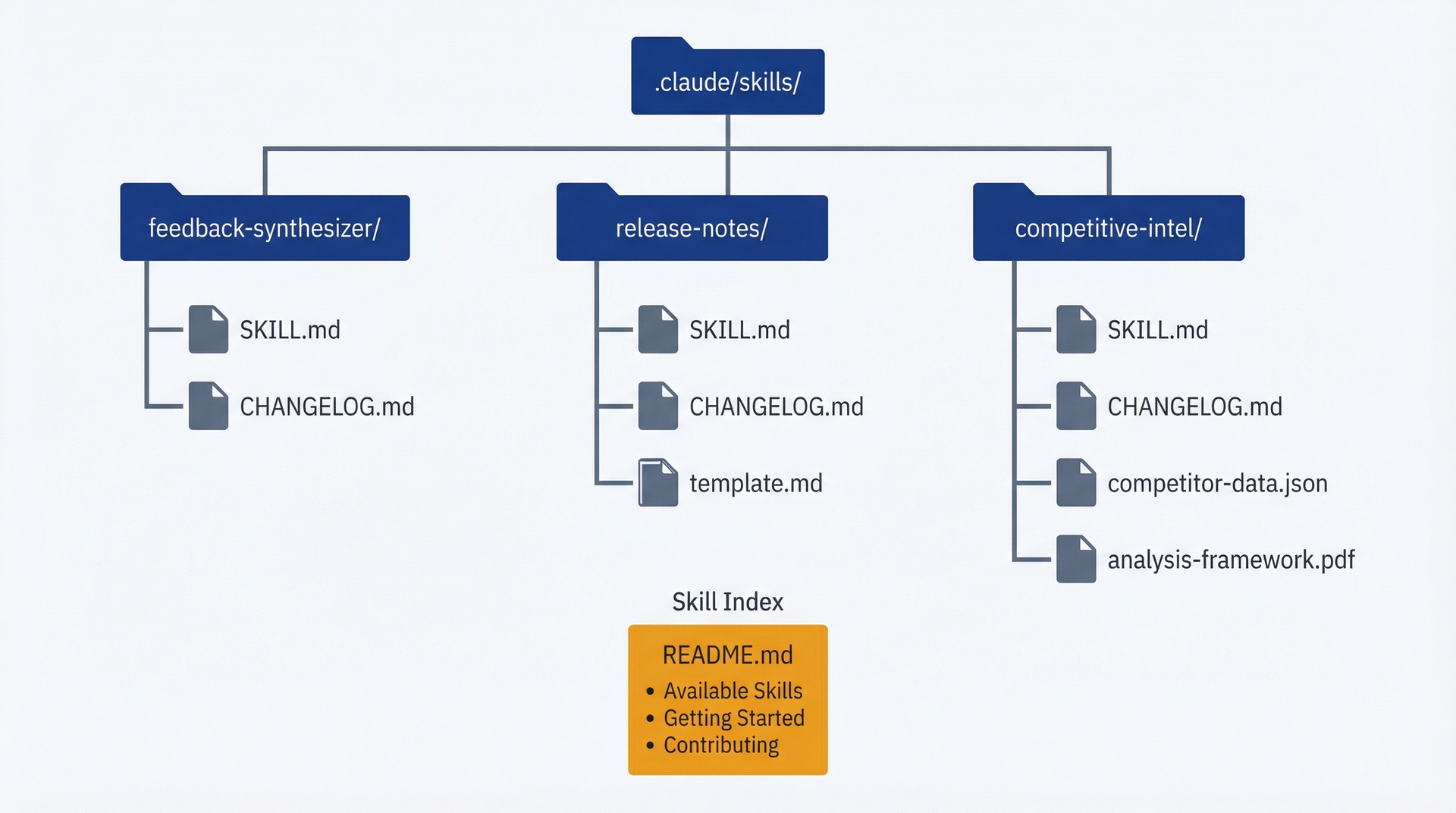
技能库组织:skills目录包含独立的技能文件夹,每个文件夹包含SKILL.md和支持文件,外加一个README索引
衡量使用率。跟踪哪些技能被使用了。简单的方法:通过git提交信息判断技能何时生成了输出:
git log --grep="feedback-synthesizer" --onelinegit log --grep="release-notes" --oneline
提交频率高的技能是有价值的。6个月内零使用的技能是弃用的候选。
常见维护触发条件:
- 技能使用5次以上 → 根据使用模式审查和优化
- 技能在新的输入格式上失败 → 更新输入处理
- 输出格式不满足干系人需求 → 调整输出规范
- 流程耗时太长 → 优化指令或拆分为更小的技能
- 团队停止使用技能 → 调查原因,改进或弃用
季度技能维护(审查所有技能,更新文档,弃用未使用的)需要30-60分钟,能让你的技能库保持其价值。
9.4 让技能适配不同请求
技能不能直接接受参数。没有像 /run-skill feedback-synthesizer --format=detailed --min-frequency=10 这样的语法。但技能可以通过从你的请求和项目文件中读取上下文来处理可变的输入。
理解技能激活与上下文。当你要求Claude Code做某件事时,它: 1. 读取你的请求 2. 检查已加载技能的描述是否匹配 3. 如果某个技能匹配,提示你加载它 4. 将SKILL.md指令加载到对话中 5. 使用这些指令加上你的原始提示来处理你的请求
你的原始提示提供了上下文:文件路径、具体需求、你想要的变体。技能指令解释了如何处理不同的场景。
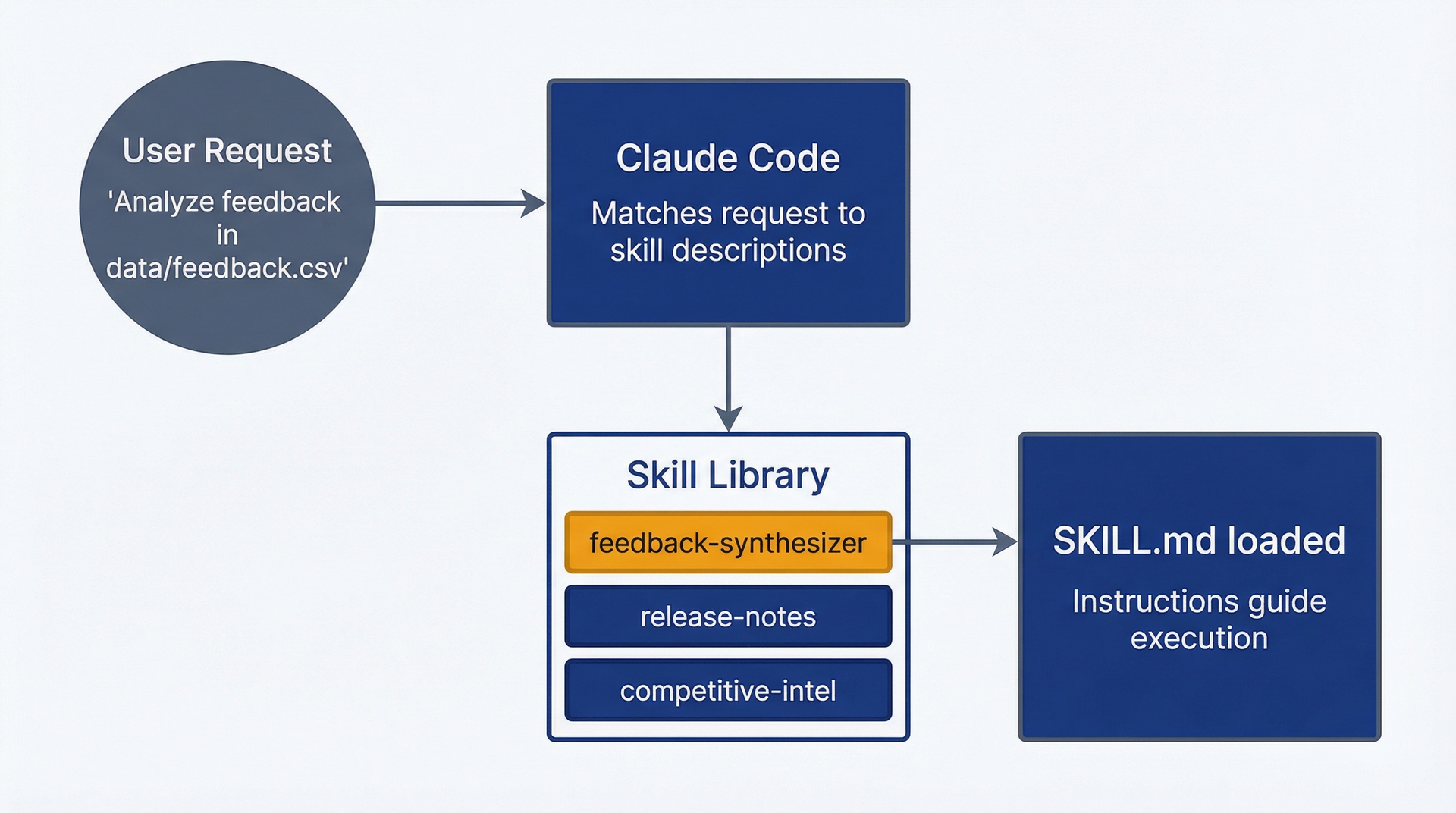
技能激活流程:用户请求匹配技能描述,触发SKILL.md加载并引导执行
可变输入的处理技巧:
基于文件格式的条件逻辑。你的技能可以指示Claude根据发现的内容进行调整:
Input HandlingCSV files:- Identify which column contains feedback text (usually "comment", "feedback", "response", or "description")- Parse each row as one feedback itemPlain text files:- Treat blank lines as separators between feedback items- Treat blocks of text as individual feedback entriesJSON files:- Parse structure and identify feedback text fields- Handle nested objects if feedback is in array of objectsAutomatically detect format based on file extension and content structure.
可变输出深度。用户可能需要不同的详细程度。通过上下文来处理:
Output DepthDefault: Generate standard theme report (10-15 themes, 3-5 quotes each)If user mentions "detailed" or "comprehensive":- Include all themes with 3+ mentions (not just 5+)- Provide 5-7 quotes per theme- Add methodology appendixIf user mentions "executive" or "summary":- Limit to top 5 themes only- 2-3 quotes per theme- Focus on actionable insightsIf user mentions "quick" or "brief":- Top 3 themes only- 1 representative quote each- One paragraph summary
处理多个输入文件。技能可以跨多个来源合成:
Multiple Input SourcesWhen user provides multiple files:1. Read all files completely first2. Note source of each feedback item (file name)3. Synthesize themes across all sources (unified analysis)4. Optionally note if themes cluster in specific sourcesExample: "Analyze feedback in data/nps-responses.csv and data/support-tickets.csv"→ Synthesize together, note if themes differ between NPS and support channels
基于环境的适应性行为。技能可以根据项目中存在的内容进行调整:
Customization via Project FilesIf .claude/feedback-categories.md exists:- Use predefined categories from that fileIf docs/personas/ directory exists:- Reference personas when identifying user segments in feedbackIf CHANGELOG.md exists:- Check recent changes to contextualize feedback (users might be responding to recent feature launches)If no customization files exist:- Use emergent theme identification (no predefined categories)
示例:发布说明技能处理内部vs.外部版本。一个技能,两种输出格式:
Output VariantsCustomer-facing release notes (default):- Product language, no technical jargon- Focus on benefits and new capabilities- Omit internal refactoring and technical debt workInternal release notes:If user mentions "internal" or "engineering changelog":- Include technical changes and refactoring- Reference pull requests and Jira tickets- Use technical terminology- Include deployment notes and breaking changesDetection: Look for keywords "internal", "engineering", "technical" in user request to determine which format to use.
基于上下文的参数化局限性。这不是真正的参数化。没有显式参数,你无法确保精确的行为。技能基于自然语言解释上下文,这可能带来歧义。
不好的例子(过于隐式):用户说"Make it detailed",但技能没有明确定义"detailed"是什么意思。这可能产生不可预测的结果。
好的例子(指令中明确说明):技能定义了具体的触发词:"If user request includes 'detailed' or 'comprehensive', then [specific behavior]."
在你的SKILL.md中记录这些上下文模式,让用户知道如何触发不同的行为:
Usage VariationsStandard invocation: "Analyze feedback in [file]"→ Produces standard theme reportDetailed analysis: "Analyze feedback in [file] and create a comprehensive report"→ Includes all themes 3+ mentions, extended quotes, methodologyExecutive summary: "Analyze feedback in [file] and create an executive summary"→ Top 5 themes only, brief formatMulti-source synthesis: "Analyze feedback in [file1] and [file2]"→ Synthesizes across sources, notes source-specific patterns
当你需要实际参数时。如果你的工作流确实需要精确的参数(数值阈值、布尔标志、复杂配置),技能可能不是正确的方法。考虑: - 构建一个Claude Code可以调用的脚本(存储在.claude/scripts/中) - 使用MCP server获取更结构化的工具接口(第10章) - 接受某些工作流需要显式对话而非自动化技能
技能在具有自然语言变体的一致性工作流中表现优异,而不是在需要精确程序控制的工作流中。
9.5 追踪技能是否为你节省了时间
构建技能需要时间。使用技能节省时间。追踪投资是否回本。
每次调用节省的时间。衡量基准(手动流程)vs.技能执行时间:
工作流手动耗时技能耗时每次节省反馈合成45分钟10分钟35分钟发布说明30分钟8分钟22分钟竞品分析60分钟15分钟45分钟PRD审计25分钟5分钟20分钟用户故事扩展40分钟12分钟28分钟
回本计算:使用多少次能收回技能构建时间?
反馈合成器: - 构建时间:90分钟 - 每次节省:35分钟 - 回本:90 ÷ 35 = 2.6次 → 第3次使用回本
如果你每季度做一次反馈分析(4次/年),这个技能在9个月内回本,此后每年节省超过2小时。
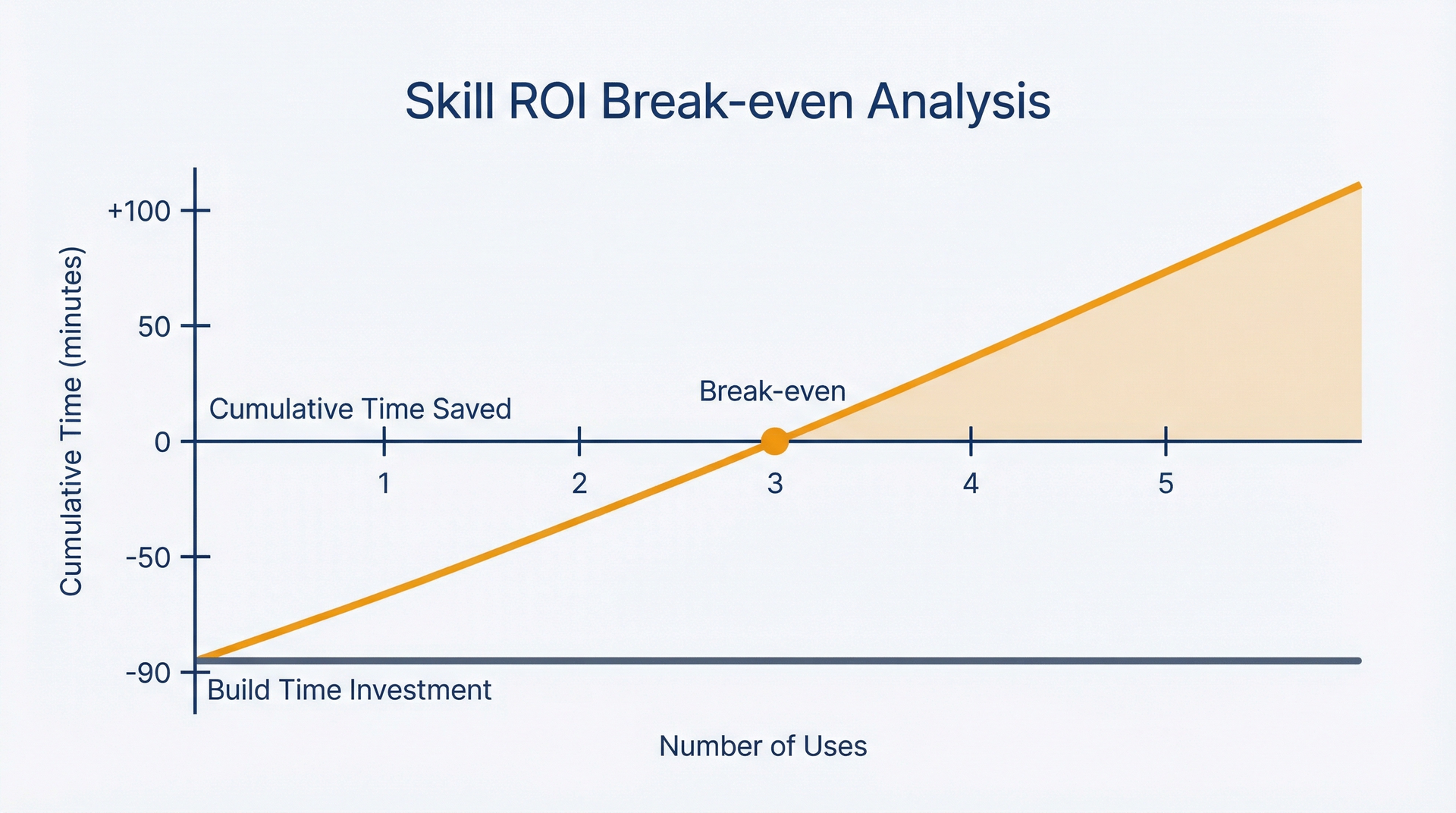
技能ROI回本:初始时间投资在大约3次使用后回收,累计节省随每次后续使用而增长
一致性改进指标。技能不仅节省时间,还提高输出一致性。难以定量衡量,但可以定性追踪:
- 使用技能前:主题分类每个季度都不同,使得年度同比比较困难
- 使用技能后:一致的分类方案,不同季度之间的趋势具有可比性
- 使用技能前:发布说明语气不一致(有时偏技术,有时偏产品导向)
- 使用技能后:每次发布保持一致的面向客户的语言风格
知识捕获价值。技能编码化了机构知识。当你离开某个项目或新PM加入时,技能传递了那些否则会丢失或需要重新学习的流程知识。
间接衡量:
- 使用技能库的新PM入职时间vs.从头学习流程
- 人员流动韧性:关键工作流在人员离开时不会断裂
- 流程文档是可执行的,而不仅仅是书面的
当技能不值得维护时。在以下情况下弃用技能:
使用率低(过去6个月使用少于2次):
- 流程重复频率低于预期
- 团队停止使用。调查原因:用户体验差?有更好的替代方案?
边际时间节省(每次使用<10分钟):
- 手动流程已经足够快;技能的开销不值得
维护负担高(每次使用都需要更新):
- 输入变化太频繁
- 流程实际上无法标准化
- 更好的做法是在没有技能的情况下交互式使用Claude Code
被更好的解决方案取代(现在有外部工具处理这个):
- Jira现在自动生成发布说明
- 分析平台新增了反馈分类功能
按技能跟踪这些指标。年度技能审计:审查使用率、时间节省和维护负担。保留高价值技能,弃用低价值的。
简单的ROI公式:
年度节省时间 = (每次节省时间 × 每年使用次数) - (初始构建时间 ÷ 使用年限) - (年度维护时间)
反馈合成器示例: - 每次节省:35分钟 - 每年使用次数:4次(季度) - 总计节省:35 × 4 = 140分钟 - 构建时间摊销(假设使用3年):90 ÷ 3 = 30分钟/年 - 维护(季度审查):15分钟/年 - 年度净节省:140 - 30 - 15 = 95分钟(1.6小时)
3年以上:节省4.8小时,投入初始90分钟 + 总计45分钟维护 = 投入时间回报3倍。
复利价值。技能不仅仅是节省时间的工具。它们是能够产生复利效应的流程改进: - 一致的方法论 → 更好的决策 - 编码化的知识 → 减少对记忆的依赖 - 团队标准化 → 更容易协作 - 质量基线 → 即使在状态不好的日子,也有更高的输出下限
这些好处更难以量化,但往往超过直接的时间节省。
你现在拥有了五个覆盖常见PM工作流的入门技能,理解了如何从零开始构建自定义技能,知道如何维护和演进你的技能库,理解了技能如何通过上下文处理可变输入,以及能够衡量你的技能是否带来了ROI。你的PM流程正在变成可执行的工作流,能够一致运行而无需认知负担。
第10章将扩展到文件系统之外,集成到你的PM技术栈中:通过MCP将Claude Code连接到Jira、Slack、Figma和数据库,以消除导出-导入循环。